Say it is 6:52 p.m. and Maya Rodriguez stares at a worksheet template. The unit on energy transfer starts tomorrow. Her notes hold three questions she has rewritten twice. Each version sounded clear until she compared it to her curriculum guide and found small errors creeping in.
That same pattern shows up when you ask a general AI assistant such as ChatGPT, Claude, Gemini or Microsoft Copilot for help. The tool produces fluent text quickly. The text can still be wrong in ways that matter to a teacher.
The useful thing to know about generative AI for teachers is that these tools predict likely text from learned patterns. They do not look up facts the way you would search a database or consult a textbook. They calculate what fits best given the words already on the page and the prompt you gave them.
How generative AI for teachers actually works
The tool generates text by predicting a plausible continuation. It draws on patterns learned from training material. It does not retrieve information the way a search engine or a library catalog does. It produces what sounds right based on what it has seen before.
This is why the output reads so smoothly. Fluent wording can make an answer sound confident even when it is wrong. Confidence is a side effect of fluent prediction, not a sign of accuracy.
Some tools can separately search the web or use documents you supply. Those features sit alongside the text generation. They do not change the underlying mechanism, which still predicts likely text rather than verifying truth.
Why fluent output is not the same as correct output
Because the tool predicts rather than retrieves, it can invent facts that sound plausible. It may cite a source that does not exist. It may present a misconception as settled truth. The sentences flow. The errors hide in plain sight.
Picture Frank Bell, the veteran social studies teacher, asking for a timeline of the Civil Rights Movement. The draft arrives with confident dates and smooth transitions. One of the events listed never happened in the form described. Frank catches it when he checks the timeline against his teaching materials.
The same risk appears in science explanations, math worked examples, or reading comprehension passages. The tool fills gaps with a plausible continuation. That continuation can be incorrect for your specific curriculum or your students’ prior knowledge.
A common mistake with generative AI for teachers is putting the first draft on a slide before checking its answer key. You might paste a generated math problem directly into a handout, only to find during class that the provided solution does not match the problem as written.
What generative AI for teachers changes in class
Everything gets checked. The tool drafts. You check it against trusted sources. You decide what reaches students. This three-step loop, called Draft, Check, Decide, runs through every practical workflow.
Because the tool cannot decide, it stays a drafting partner. Do not hand it final grades, diagnoses, or final reports. You make and check those decisions under your school’s policy.
Your school’s policy decides first. The linked article on how to check AI-generated content before it reaches students gives a repeatable routine. It follows the same Draft, Check, Decide pattern and adds specific questions about facts, level, bias, clarity of instructions, answer keys, and sources that turn out not to exist.
Five jobs generative AI for teachers is actually good at
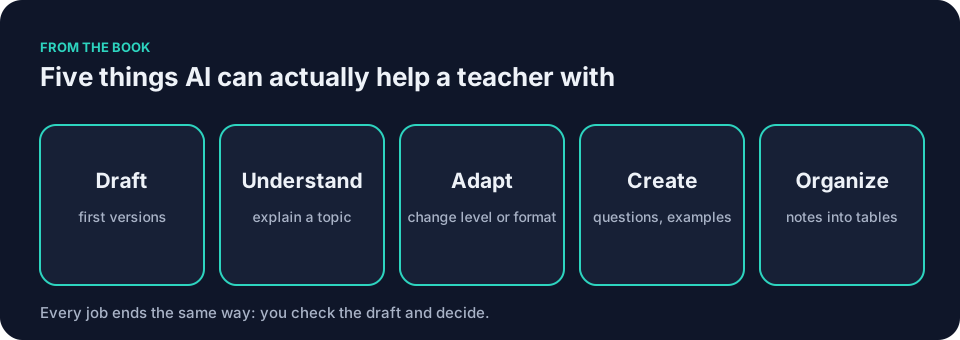
Generative AI for teachers performs five classroom tasks well when you give it clear boundaries. Use five verbs to remember them.
It can DRAFT a lesson outline, a parent note, or the first version of a rubric.
It can help you UNDERSTAND a thick stack of curriculum documents by pulling out key points.
It can ADAPT one worksheet for students who need more support or more challenge.
It can CREATE practice questions, sentence stems, or simple classroom visuals.
It can ORGANIZE scattered notes into a clean table or a slide outline.
The assistant must not make the final decision about whether the draft is accurate, age-appropriate, or aligned with your school’s values. That step stays with the teacher. For more on these five jobs and the one job it cannot do, see how teachers can use AI.
Choosing a tool for classroom use
Most teachers need only three kinds of tool. A general AI assistant handles open-ended drafting. A document-grounded tool such as NotebookLM works with documents you provide; you still check any quotation, citation, or claim against those documents. A teacher-specific tool such as MagicSchool or Brisk walks you through common classroom tasks.
Tools and their settings change. Check the current settings and your school’s approval before you rely on any tool. Details on these categories and when each helps appear in the article AI tools for teachers: the kinds worth knowing.
A general assistant can draft a slide outline or practice questions. One rule applies to all of them. Do not enter identifying student information unless the school has approved that tool and that use.
One experiment you can run tonight with generative AI for teachers
Open any general AI assistant your school has approved. Paste the following prompt, filling in the bracketed slot with your grade level.
You are helping a [seventh-grade] science teacher. Draft a short explanation of how thermal energy moves between objects. Use only these two facts: thermal energy moves from warmer objects to cooler ones; cold is not a substance that moves. Write at a seventh-grade reading level. Flag any statement that goes beyond the two facts.
Send it. Read the output twice. Compare each sentence against the two facts you supplied. Notice any extra claims that slipped in. Notice how confidently they are stated.
Say the draft includes this sentence: “When you touch a cold metal chair, the cold flows into your hand and makes your hand feel cold.” That sounds reasonable. It is also wrong according to the second fact you provided. Cold is not a substance that moves. Thermal energy moves from your warmer hand to the cooler chair.
You would verify that sentence against your own knowledge and the supplied facts. You would revise it to say something like: “When you touch a cold metal chair, thermal energy moves from your warmer hand to the cooler chair. Your hand loses energy, so it feels cold.” The revision keeps the reading level and corrects the misconception.
Check every sentence against the two supplied facts regardless of whether the tool flags anything. The flag is a hint, not a guarantee. If the tool follows the prompt correctly, you still learn something. You see which instructions it obeyed and which it ignored. You see how it handled the constraint to flag uncertain statements. You see whether it added details you did not ask for. That tells you what to tighten next time.
For a second test, deliberately introduce a flawed sentence. Paste this prompt, filling in the bracketed slot with the statement you want checked.
Critique this statement: "[When you touch a cold metal chair, the cold flows into your hand and makes your hand feel cold.]" Use only these two facts: thermal energy moves from warmer objects to cooler ones; cold is not a substance that moves. Flag any part of the statement that conflicts with the facts.
Do not promise it will catch the error. See what it says. Then check its critique against the two facts you supplied.
Save both the prompt and the response. Tomorrow night, edit one sentence in the prompt and run it again. Compare the two responses and note what changed, including anything that did not follow the revised instruction.
Before you paste anything
Use a quick filter before you paste anything, then follow your school’s policy. Ask yourself the color of the material.
Green means go ahead: generic planning, public facts, material you wrote that names no one.
Yellow means ask first: anonymized student work, internal guides, anything that requires checking your school’s policy before you proceed.
Red means do not paste: student names, grades, health details, or any identifying or sensitive student material must not go into a tool your school has not approved.
If you feel unsure, treat it as yellow. Your school’s policy decides first.
The prompt is the instruction, not the product
Your words set the boundaries. A vague request forces the model to guess grade level, length, tone, and constraints. A specific instruction narrows the range of likely predictions. You still check what comes back.
Seven ingredients help: context, goal, constraints, examples, output shape, review, and iteration. You do not need all seven every time. Give it enough direction to make the draft easier to check; it may still invent details.
A worked example in science
Picture Maya Rodriguez needing an eighth-grade worksheet on energy transfer. She wants eight short retrieval questions, one short-response item, a two-question exit ticket, student-facing success criteria, a teacher note on a common misconception, and a separate answer key. She supplies three facts only: thermal energy moves from warmer objects to cooler ones; cold is not a substance that moves; and insulation slows the transfer of thermal energy.
She opens her approved general AI assistant at 6:18 p.m. The prompt she uses runs about one hundred words. It lists context, goal, constraints, an example of the kind of everyday object she wants mentioned, output shape, and review instructions.
You are helping an eighth-grade science teacher. Draft a worksheet on energy transfer. Use only these three facts: thermal energy moves from warmer objects to cooler ones; cold is not a substance that moves; insulation slows the transfer of thermal energy. Include eight short retrieval questions, one short-response item, a two-question exit ticket, student-facing success criteria, a teacher note on the misconception that cold flows, and a separate answer key. Use plain language. Flag any statement that goes beyond the three facts.
The first draft arrives. It looks clean. Two questions test the same idea. One answer key entry claims heat energy disappears. The misconception note misses the exact wording students usually use.
Maya circles the problems. She quotes the weak items and sends a short follow-up request: rewrite question four so only one answer is defensible, correct the answer key line about disappearance, and keep every other part unchanged. The second draft improves. She still rewrites one sentence herself.
Frank Bell stops by the copier. He spots the lingering phrasing that could reinforce the idea that cold travels. They fix it together. Maya changes the answer key line, rewrites the misconception note in her own words, and checks each question against her three facts before printing.
The next week Maya changes only the topic and the three facts. The structure stays. She reuses the prompt but checks the new facts, questions, and key.
A worked example in social studies
Picture Frank Bell wanting a short reading passage on the Voting Rights Act of 1965 for his eleventh-grade class. He needs the passage at a ninth-grade reading level, three comprehension questions, one connection question tied to a local primary source, and a separate answer key.
He supplies a [verified excerpt from your course materials] and asks the tool to quote only from that excerpt. He instructs the tool to flag any statement that goes beyond the excerpt.
You are helping an eleventh-grade social studies teacher. Draft a reading passage at a ninth-grade level about the Voting Rights Act of 1965. Use only this excerpt: [verified excerpt from your course materials]. Include three comprehension questions and one connection question. Quote only from the excerpt. Flag any statement that goes beyond the excerpt.
The draft arrives. Frank checks each date and quotation against the excerpt he supplied. He removes any invented material and corrects any errors he finds. He treats the local primary source the same way: he supplies the excerpt, asks the tool to use only that material, and checks any quotation or citation against the source. The revised passage fits his lesson. The exercise reminds him that the fluent paragraph is a starting point, not finished material.
A worked example in elementary math
Picture a fourth-grade teacher named Jordan who needs a set of word problems on two-digit by one-digit multiplication. Jordan wants six problems, each with a clear context, numbers that stay within two-digit by one-digit multiplication, and an answer key that shows one way to solve each problem.
Jordan writes a prompt that lists the grade, the skill, the number range, and the output shape.
You are helping a fourth-grade teacher. Draft six word problems on two-digit by one-digit multiplication. Use only these constraints: each problem must involve a two-digit number multiplied by a one-digit number; each problem must have a clear context (such as school supplies, snacks, or classroom materials); include an answer key that shows one way to solve each problem. Use plain language. Flag any problem that does not fit the constraints.
The draft arrives with six problems. One problem uses a three-digit number. Another problem has an answer that does not match the multiplication shown. A third problem describes a context that makes no sense for the numbers given.
Jordan checks each problem by solving it. He fixes the three-digit number, corrects the mismatched answer, and rewrites the confusing context. One problem asks: “A school buys 24 packs of pencils. Each pack has 6 pencils. How many pencils does the school buy?” The answer key shows 24 × 6 = 144. Jordan solves it himself and confirms the arithmetic. The final set works. The check took longer than the generation.
A six-point review for any handout
Before any AI-generated handout reaches students, run these six checks.
- Check every fact against your own materials or a trusted source. The tool predicts; it does not verify.
- Check the reading level against a sample of your own past handouts. Adjust until the sentences match the way you speak to the class.
- Check for bias in examples, names, or scenarios. Make sure the material reflects your students.
- Check that instructions are clear enough for a student to follow without asking you.
- Check the answer key by solving every problem yourself. Do not trust the tool’s arithmetic or reasoning.
- Check any source the tool mentions. If it cites a book, article, or study, confirm that the source exists and says what the tool claims.
If any check fails, revise before you print.
Common mistakes with generative AI for teachers and how to fix them
One frequent mistake is giving a one-sentence request. The tool guesses the rest. The output wanders. Add three constraints and one example. The draft narrows.
Another mistake is skipping the review step. Teachers can ask the tool to flag uncertain statements, but they must find and verify errors themselves. The flag is a hint, not a guarantee.
A third mistake is pasting the draft straight into a slide or handout. Run the six-point review above. Facts first. Then level, bias, and clarity. Finally the answer key and any sources.
Questions teachers ask
How do I know the tool did not copy real student work?
You cannot establish originality from fluent output. Check distinctive wording against the material you supplied, and follow your school’s policy before entering student work. If you suspect the output resembles an outside work, run a plagiarism check or search for exact phrases. That check can flag matching text, but it cannot prove the output is original.
Can generative AI for teachers grade my students’ essays?
It can draft rubric language or suggest comment stems. You check the suggestions. You decide the final comments and scores. The tool can offer a judgment; the teacher makes the final decision under the school’s policy.
Does the tool improve if I give it more examples?
It can. Test an example against a version without one and keep whichever draft needs less editing. Small changes to the prompt can shift the output.
What if the draft sounds too perfect for my students?
Check the reading level against a sample of your own past materials. Ask the tool to simplify one paragraph. Compare. Adjust until the sentences match the way you speak to the class.
How much time does this actually save?
Start with one low-risk task. Time how long drafting and checking take on that task. Compare it to doing the same task without the tool. The answer depends on the task and on how much checking the draft needs.
One reusable prompt for worksheet drafts
You are helping a [grade level] teacher draft classroom materials.
Context:
- Topic: [your topic]
- Learning objective: [what students should be able to do]
- Content taught: [list the facts or skills students have already learned]
- Class condition: [reading levels, language needs, or other relevant details]
- Available materials: [paper, pencil, devices, lab equipment, etc.]
Goal:
Draft a [time length] retrieval-practice worksheet that I will review before students see it.
Constraints:
- Use plain language.
- Include [number] short retrieval questions, [number] short-response questions, and a [number]-question exit ticket.
- Do not add homework, extensions, a full lesson plan, extra diagrams, invented standards, citations, or student information.
- Keep the content within the facts listed above.
Examples:
Use familiar classroom objects or scenarios such as [example 1], [example 2], or [example 3]. Include at least one item that surfaces a common misconception about [the topic].
Output shape:
1. Student-facing success criteria
2. Student worksheet
3. Teacher-facing misconception note
4. Separate answer key
Review:
Flag any statement, answer, or wording I must verify. Identify any item with more than one defensible answer. Do not call the draft ready for students.
After drafting, wait for my revision requests.
Copy the block. Replace the bracketed slots with your own details. Run it. Check the result. Edit one line at a time.
If you want to go further, UNESCO’s guidance on generative AI in education and research offers a global perspective on how schools can approach these tools. OpenAI’s guide for educators includes example prompts you can adapt.
The book Keep It Simple: AI for Teachers walks through these same ideas in plain language. The chapter “You Don’t Need to Be an AI Expert” is for teachers who want to get started without mastering the technology. The first four chapters appear in the free sample on this site.
Open your school’s approved AI assistant tonight. Paste the thermal-energy prompt above. Run it once. Save the output somewhere you can find tomorrow.