Picture Maya Rodriguez at 6:45 p.m. The coffee on her desk has gone cold again. Tomorrow’s eighth-grade science lesson on thermal energy transfer sits in her plan book as a title and nothing else. Twelve years in the classroom have taught her the pattern. The blank space is not about ideas. It is about time.
A general AI assistant such as ChatGPT, Claude, Gemini or Microsoft Copilot can take a first run at some of that work. So can a document-grounded tool such as NotebookLM, or a teacher-specific tool such as MagicSchool or Brisk. Tools and their settings change, so the exact commands will shift. None of them can decide. That part stays with the teacher.
The question of how teachers can use AI gets easier when you name the job first. Five verbs cover the work. Draft. Understand. Adapt. Create. Organize. Each verb names a task the tool can help with, and each task ends the same way: the teacher checks the output and decides what reaches students.
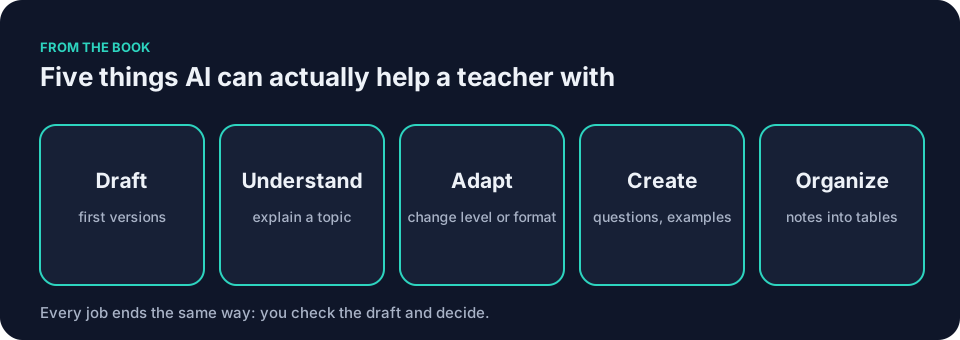
Draft
Maya starts from the thermal-energy facts she trusts. She opens a school-approved general assistant and pastes a saved prompt that already contains her constraints and output shape. The tool returns a fifteen-minute retrieval worksheet with eight short questions, one short-response item, a two-question exit ticket, student-facing success criteria, and a separate answer key.
She reads every line against her source material. One answer claims cold travels from a table into a mug. Two questions test the same idea. The misconception note is useful, but the exit ticket needs one clearer sentence. She rewrites those parts and prints the page. The draft gave her something to react to instead of a blank template. The science on the final sheet is hers.
Here is the prompt she uses.
You are helping an eighth-grade science teacher.
Context: [topic: thermal energy transfer, objective, what students already know, mixed reading levels]
Goal: Draft [a fifteen-minute retrieval worksheet] that I will review before students see it.
Constraints: [eight short questions, one short-response item, one exit ticket, reading level, no invented facts]
Examples: [one question written in your own voice]
Output shape: [numbered list, separate answer key, teacher notes]
Review: Flag anything I must verify against my own sources.
After drafting, wait for my revision requests.
The full workflow, with Maya’s lesson as the running example, is in Using AI for lesson planning without losing the lesson.
Understand
Say Frank has four articles for his voting rights unit and two pages of his own margin notes. He loads them into a document-grounded tool, which works only with the material he supplies. He asks it to find claims in those articles that students might confuse. He also asks the tool to point to the passage behind each claim.
What comes back is a list with locations. Frank opens each original passage and reads it himself. One summary has dropped a qualification that appears in one of his source articles, so he restores it and adds the date his students already know. He ends with a short list he can turn into an opening discussion. The tool did not read the articles for him. It told him where to look, and he did the reading.
His prompt looks like this.
You are helping a high school social studies teacher.
Context: [four articles on voting rights, two pages of teacher notes]
Goal: Identify claims in these documents that students might confuse.
Constraints: [only use the supplied documents, point to the passage behind each claim]
Output shape: [a list with locations]
Review: Flag any claim that lacks a clear source passage.
After drafting, wait for my revision requests.
Adapt
Maya has a single 650-word passage on thermal energy. She pastes it into the general assistant with instructions for three versions. One at a simpler reading level with vocabulary footnotes. One with extension tasks for early finishers. One that keeps the original length but adds sentence starters.
All three come back in one pass. She reads them side by side. The simplified version dropped the distinction between heat and temperature. She restores that sentence, removes the invented headings, and prints the set. Every student receives the same objective and the same core facts. The differences stay in sentence length and support. The check that matters is whether the meaning survived. More on this exact approach is in AI for differentiated instruction: one lesson, several ways in.
The prompt she uses is below.
You are helping an eighth-grade science teacher.
Context: [one 650-word passage on thermal energy, objective, what students already know]
Goal: Create three versions of this passage for different readers.
Constraints: [simpler reading level with vocabulary footnotes, extension tasks, original length with sentence starters, keep the core facts identical]
Output shape: [three clearly labeled versions]
Review: Flag any change that alters the meaning.
After drafting, wait for my revision requests.
Create
Say Jordan’s class keeps writing thesis statements that announce a topic instead of making an argument. He wants a short practice set for tomorrow’s warm-up. He asks for three sample thesis statements about books the class has not read. Two weak and one strong. He also wants a student-facing explanation of what makes the strong one work. He gives the tool one example he wrote last week, stripped of any name, so it can match his voice.
Jordan reads what comes back the way his students will. One weak example is actually arguable, which would confuse the exercise, so he replaces it. The explanation of the strong example uses a term his class has not learned yet, so he swaps in the phrase they use. He keeps what survives the check and rewrites the rest.
His prompt is here.
You are helping a high school English teacher.
Context: [students write thesis statements that announce rather than argue, objective, books the class has not read]
Goal: Draft three sample thesis statements and a student-facing explanation.
Constraints: [two weak, one strong, no books the class has read, match my voice]
Examples: [one thesis statement written in your own voice]
Output shape: [three samples, one explanation]
Review: Flag any example that is actually arguable.
After drafting, wait for my revision requests.
Organize
Say Denise needs to send a message home about a difficult afternoon. She has her own notes from the front office. What happened. When it happened. What the school did. She opens a school-approved tool, pastes only the facts with no student names, and uses a prompt that forbids speculation.
She gets a short, calm paragraph. She reads it against her notes line by line. One sentence states a motive she does not actually know, so she deletes it. She adds the exact time of the incident and fixes one verb. What goes home says only what she can stand behind. The longer version of this workflow, covering parent emails, meeting notes into action lists and newsletters, is in AI for teacher admin: emails, notes and the small jobs.
Her prompt looks like this.
You are helping a school front office staff member.
Context: [notes on a difficult afternoon, what happened, when, what the school did]
Goal: Draft a short, calm message home.
Constraints: [no student names, no speculation, only facts from my notes]
Output shape: [one paragraph]
Review: Flag any sentence that states a motive or guess.
After drafting, wait for my revision requests.
How teachers can use AI, and the one job it cannot do
Decide. The tool never chooses the final wording that reaches students. It never decides a grade. It never decides a referral. It never decides what a parent should hear. Those calls stay with the teacher or the school staff member responsible, subject to school policy. The pattern is always the same. The tool drafts. You check it against what you know and what your school allows. You decide.
What stays with the teacher
Maya catches the cold-travels error because she knows the science and knows where eighth-graders stumble. Frank restores the dropped qualification because he has read those articles closely enough to notice a missing sentence. Jordan replaces the arguable weak example because he knows what his students will find confusing. Denise deletes the motive because she was in the office that afternoon and the tool was not.
Checking is not a courtesy step. It is the job. Read every draft against your own sources before you use it, and fix or cut whatever you cannot verify. The tool never decides.
How teachers can use AI: pick one verb tonight
Match the verb to the task that is actually eating your time tonight. If tomorrow’s lesson is still a blank page, start with Draft. If you have a pile of documents and no thread through them, start with Understand. If one reading does not fit everyone in the room, start with Adapt. If you need fresh practice material in your own voice, start with Create. If the inbox and the note pile grew again today, start with Organize.
Choose one low-risk task. Set aside ten minutes to try one small task; stop if checking the draft needs longer. Do not try to learn the whole subject tonight. This ten-minute version keeps the focus on the classroom, not on AI.
Before you paste anything, run it through the quick color test. Green items such as generic planning or public facts can go straight into a tool your school’s policy permits. Yellow items such as anonymized student work need a check with your school first. Red items such as student names, grades, or anything that could identify a child never go into a tool your school has not approved. When in doubt, your school’s policy decides.
How teachers can use AI prompts: the seven ingredients
A good prompt does not need fancy language. It needs the information the tool would otherwise invent. These seven ingredients make a classroom request easier to draft and easier to check.
Context tells the tool what changes the answer. Give it the grade band, subject, learning objective, content already taught, the vocabulary that matters, and the broad conditions of your room.
Goal names one job. Draft six questions that show whether students can explain thermal energy transfer is a goal. Make a science quiz is a topic, and topics get you mush.
Constraints are the limits that prevent unwanted extras. State the length, number and type of items, reading level, materials, tone, vocabulary, and things the tool must not invent.
Examples show the tool your voice. One question written in your own classroom style shows the tool the sentence length and kind of thinking you want. Never paste identifiable student work into a tool your school has not approved.
Output shape tells the tool how to arrange the draft. Ask for a student section and a separate answer key. Request numbered items, blank lines, a table, or teacher notes when those features matter.
Review instructions identify what you want surfaced for checking. Ask the tool to flag uncertain facts, possible multiple answers, reading-load problems, missing information, or wording that might reinforce a named misconception.
Iteration means fixing the useful draft instead of starting over. Quote the weak item and ask for one change. The rest of the draft stays intact.
The prompt is the instruction, not the product. You still check it. You still decide.
Common mistakes with how teachers can use AI
One trap in how teachers can use AI is treating the first output as final. The tool predicts likely text from patterns in its training and from the words you provide. It is not automatically looking up your curriculum or checking each claim. A fluent answer can sound certain while being wrong. The fix is simple. Read every line against your own trusted sources.
Another mistake is to hand over yellow or red information without checking school policy first. Student names, grades, attendance, discipline records, IEP details, or any piece of student work that could identify the writer must stay out of any tool your school has not approved. Your school’s guidance decides. The TeachAI, AI Guidance for Schools Toolkit offers one free starting point for writing that guidance.
A third mistake is to skip the color test and paste everything into the first convenient tool. Green items go ahead. Yellow items require a prior conversation with your school. Red items do not go into a tool your school has not approved; follow your school’s policy. The line is not about how clever the tool is. It is about whose information you are handing over.
A worked example of how teachers can use AI in middle school science
Return to Maya’s thermal-energy lesson. She opens her saved prompt block. She replaces the bracketed parts with today’s details. The tool drafts the worksheet. She spends the next six minutes reading it against her notes. She corrects two scientific statements. She deletes one duplicated question. She rewrites the exit ticket so it asks students to explain rather than fill in a word. The final page is hers.
That same prompt can shift to a different topic tomorrow. Change the context and the facts. Run it again. Check the new draft. Decide what reaches students. The pattern repeats.
Questions teachers ask
How do I start if I have never used these tools before?
Open the general assistant your school has already approved. Paste the prompt block below. Replace the bracketed parts with your own details. Run it once tonight on something small. Set aside ten minutes to try one small task; stop if checking the draft needs longer.
You are helping a [grade and subject] teacher.
Context: [topic, objective, what students already know, mixed reading levels, materials available]
Goal: Draft [one specific thing] that I will review before students see it.
Constraints: [length, reading level, tone, things the tool must not add]
Examples: [one item written in your own voice]
Output shape: [numbered list, separate teacher notes, answer key]
Review: Flag anything I must verify against my own sources.
After drafting, wait for my revision requests.
Change one line and run it again if the first version needs work. Then do the part the tool cannot do. Read the draft against what you know. Fix what it got wrong. Decide whether any of it reaches your students tomorrow.
What if the draft contains an error I miss?
That happens. The tool is a drafting partner, not a fact-checker. Your job is to catch it. Keep your trusted sources open beside the screen. Compare line by line. If the error reaches students, own it and correct it the next day. The habit of checking grows with practice.
Can I use AI for high-stakes decisions?
No. Grades, referrals, safety concerns, and parent communications that carry consequences stay with the responsible adult. A guide to how teachers can use AI needs a firm boundary: the responsible adult decides grades and referrals. The OpenAI, Teaching with AI guide for educators using ChatGPT offers example prompts. School policy remains the final authority.
How much time does this actually save?
One low-risk task tonight. One draft. One careful check. One decision. Drafting and review time vary with the task and the teacher. If checking takes longer than starting from scratch, choose a smaller task. Maya finishes her thermal-energy worksheet at 7:05 p.m. She reheats her coffee once instead of twice. The scene is texture, not a measured result.
Do I need to become an AI expert?
No. You need to become better at giving clear instructions and reading the results with a teacher’s eye. The rest is practice on real classroom tasks. The book Keep It Simple: AI for Teachers uses the five verbs to describe classroom tasks. Its free sample contains the first four chapters and nothing more.
Keep It Simple: AI for Teachers opens with the chapter “Do Any of These Sound Familiar?” and follows the same ten-minute rhythm you can start tonight. The free sample contains that chapter and the three that follow it.
Open the general assistant your school has already approved. Paste the prompt block above. Replace the bracketed parts with your own details. Run it once tonight on something small. Change one line if the first version needs work. Then read the draft against what you know, fix what it got wrong, and decide what reaches your students tomorrow.