Picture Jordan Kim at 6:45 p.m. Twenty-seven short responses sit open on the desk. A comment is due on each one by morning. The first prompt in the feedback group below helps Jordan start a reusable comment bank for exactly that stack.
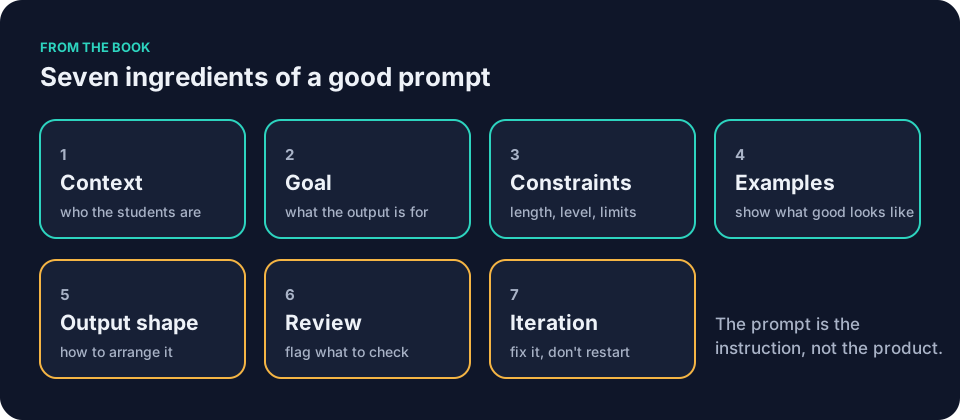
These prompts form a teacher prompt library. They draw on the seven ingredients from How to write AI prompts for teaching: the seven ingredients. Copy one tonight. Fill the slots. Run the ten-minute version.
Before you paste anything, sort the material. Generic planning information stays green. Public facts stay green. Your own lesson objectives stay green. Anonymized student work is yellow. Check your school’s policy first. Restricted information is red. It never goes into a tool your school has not approved. When in doubt, follow your school’s policy.
Run these in whatever tool your school has approved. That might be a general AI assistant such as ChatGPT, Claude, Gemini or Microsoft Copilot. Or a document-grounded tool such as NotebookLM. Or a teacher-specific tool such as MagicSchool or Brisk. A document-grounded tool answers only from documents you give it, so supply the excerpt or worksheet the prompt asks for. Tools and their settings change, so confirm what your school allows before you start.
Planning prompts
Prompt 1: Lesson outline
You are helping a teacher plan a [grade] [subject] lesson.
Context: The class already knows [prior topics]. Objective is [exact objective]. Period length is [minutes]. Materials available are [list].
Goal: Draft a complete lesson outline I will review before class.
Constraints: Use plain language. Limit to [number] minutes total. No homework, no invented standards, no student names.
Output shape:
1. Objective and success criteria
2. Timed steps with transitions
3. Materials list
4. Quick-check question at the end
Review: Flag any step that needs extra verification or timing adjustment.
Check the timing blocks, the prior-knowledge assumptions, and every fact against your own materials.
Prompt 2: Unit calendar
You are helping a teacher organize a [subject] unit for [grade].
Context: The unit runs [number] weeks. Key standards are [list]. Students have already covered [topics]. Class meets on [days of week] from [start date] to [end date]. Known interruptions are [assemblies, testing days, holidays, field trips].
Goal: Produce a dated calendar I will edit before sharing.
Constraints: Schedule only the actual meeting dates between [start date] and [end date]. Leave every date I listed as an interruption blank. Limit major activities to [number] per week and assessments to [number] total.
Output shape: Table with columns for Date, Focus, Activities, Assessment, Notes.
Review: Flag any objective that will not fit the available dates or any standard I must double-check.
Check that every standard matches your district list and that the pacing fits your actual meeting dates.
Prompt 3: Materials list
You are helping a teacher prepare for a [grade] [subject] lesson on [topic].
Context: Class size is [number]. Expected attendance is [number]. Time available is [minutes]. Room has [equipment]. Supplies already on hand are [list].
Goal: Create a complete materials checklist I will verify before setup.
Constraints: Use only the supplies I listed or items I can copy within [number] pages. No special-order supplies.
Output shape: Bullet list grouped by teacher, students, and optional extras. Include quantities.
Review: Mark anything that might be missing from my actual classroom.
Check quantities against your expected attendance plus a few spares.
Adapting prompts
The teacher prompt library works best when you paste the exact source text, then check the adaptation against it for added or changed facts.
Prompt 4: Reading adjustment
You are helping a teacher adapt a text for mixed reading levels.
Context: [Paste a short excerpt of the text here.] Grade band is [grade]. Objective is [exact objective].
Goal: Produce two adapted versions I will check before students read them.
Constraints: Version A at [reading level]. Version B at [reading level]. Same core facts. Keep essential subject vocabulary and simplify the surrounding language. No added diagrams.
Output shape: If I pasted the original, show a side-by-side comparison with changed sentences marked. If I gave no excerpt, do not rewrite; instead give me a proposed adaptation plan listing what you would change and what you would keep.
Review: Flag any sentence that changes meaning or drops a required fact.
Check that both versions still support the exact objective and contain the same key facts.
Prompt 5: Differentiated worksheet
You are helping a teacher adapt a worksheet.
Context: [Paste the original worksheet or its actual items here.] Class has students working at [list levels]. Objective is [exact objective].
Goal: Create three leveled versions I will review before copying.
Constraints: Same number of items. Plain language. No extra graphics. Use only facts from the source material I provided.
Output shape: Three separate student pages plus one teacher key that shows differences. If I did not supply the original items, stop and ask me to paste them.
Review: Identify any item that no longer matches the original objective.
Check alignment between each version, the answer key, and the single objective you wrote.
Prompt 6: ELL support
You are helping a teacher add language supports.
Context: Topic is [topic]. Original activity is [paste the actual activity text or its exact steps here]. Students need sentence frames and a word bank for [language levels]. Previously taught vocabulary is [list words]. New topic words that need definitions are [list words].
Goal: Add supports to the existing activity so I can paste them in before class.
Constraints: Keep total time under [minutes]. Use previously taught words without definitions. Define new topic words in the word bank.
Output shape: Original activity with supports inserted in bold, plus a separate word bank. If I did not supply the activity text or steps, stop and ask me to paste them.
Review: Check that every added frame still leads to the correct content answer.
Check that the supports do not give away answers or lower the cognitive demand.
Question prompts
When you use this teacher prompt library, keep the review line: it asks the tool to flag problems before you run your own check.
Prompt 7: Retrieval questions
You are helping a teacher write retrieval questions.
Context: Topic is [topic]. Students have learned [list facts]. Objective is [exact objective].
Goal: Draft ten retrieval questions I will edit before class.
Constraints: Mix of short answer and multiple choice. No more than two questions on the same sub-fact. Plain language.
Output shape: Numbered list, followed by a separate answer key.
Review: Flag any question with more than one correct answer or any fact I must verify.
Check every answer against your own notes or the textbook page you trust.
Prompt 8: Discussion questions
You are helping a teacher prepare discussion questions.
Context: [Paste an approved excerpt here, or supply its relevant details such as topic, length, and key points.] Grade is [grade]. Goal is to surface [specific thinking skill].
Goal: Create six open questions that build toward the objective.
Constraints: No yes-or-no questions. Each question must require evidence from the material I provided. If I supplied no excerpt or details, ask me to paste them rather than invent evidence.
Output shape: Three pairs that move from recall to analysis. Include one teacher note per pair on likely student answers.
Review: Mark any question that could be answered without the required evidence.
Check that the sequence actually leads to the thinking skill you named.
Prompt 9: Exit ticket
You are helping a teacher write an exit ticket.
Context: Lesson objective is [exact objective]. Time left at end of class is two minutes.
Goal: Draft a two-question exit ticket I will copy before the bell.
Constraints: One retrieval item, one application item. Space for three lines total.
Output shape: Clean student version and a separate answer key.
Review: Confirm both questions directly test the stated objective.
Check that a student who mastered the objective can finish in the time you have left.
Feedback prompts
Prompt 10 makes comments from assignment-wide patterns. Prompt 11 still requires the teacher to match each comment to an individual paper.
Prompt 10: Comment bank
You are helping a teacher build a feedback bank.
Context: Assignment is [describe]. Common strengths are [list three]. Common issues are [list three].
Goal: Create ten reusable comments I can adapt quickly.
Constraints: Each comment must name a specific strength or error, suggest one concrete next step, and stay under twenty words.
Output shape: Numbered list with labels "Strength" or "Growth."
Review: Flag any comment that sounds generic or could apply to any assignment.
Read each comment aloud and cut any that sound like a template instead of your classroom voice.
Prompt 11: Narrative feedback
You are helping a teacher draft feedback on [assignment].
Context: Student work shows [describe pattern without names]. Objective was [exact objective].
Goal: Produce three sample paragraphs I can adapt before sending.
Constraints: Start with one specific praise, name one concrete improvement, end with a next step. No grades in the text.
Output shape: Three separate paragraphs.
Review: Flag any line that could apply to every student or that guesses at effort.
Check that the examples still match the actual patterns in the stack on your table.
Prompt 12: Rubric
You are helping a teacher build a rubric.
Context: Assignment is [describe]. Success looks like [three bullet traits]. Grade level is [grade].
Goal: Draft a four-level rubric I will tune before use.
Constraints: Four performance levels. Language must be student-facing. No vague terms such as "good" or "excellent."
Output shape: Table with a criteria column on the left and four level columns across the top, plus one teacher note at the bottom.
Review: Flag any cell where the language is vague or where two levels sound the same.
Test the draft yourself against work you have already graded, and check that a student could use it to predict the score you would give.
Admin prompts
Denise Carter in the front office faces the same short messages that eat minutes. These prompts keep tone calm and facts clear.
Prompt 13: Parent note
You are helping a front-office or classroom teacher write a note home.
Context: Situation is [neutral description]. Tone must stay calm and factual.
Goal: Draft a short message I will edit before sending.
Constraints: Under 120 words. No diagnosis, no assumption of cause, no student name in the draft.
Output shape: Greeting, one clear paragraph, next step, closing.
Review: Flag any sentence that could be misread as blame.
Check the final version against your school’s exact communication policy.
Prompt 14: Meeting agenda
You are helping a teacher prepare for a [type] meeting.
Context: Purpose is [one sentence]. Attendees are [roles]. Time is [minutes].
Goal: Create a timed agenda I will adjust before the meeting.
Constraints: No more than four items. End with clear next steps.
Output shape: Numbered list with time allocations and an owner for each item.
Review: Flag any item that does not serve the single purpose I named.
Check that the times add up to the actual slot you reserved.
Prompt 15: To-do list
You are helping a teacher organize a chaotic week.
Context: Tasks on my plate are [list]. Priorities are [list]. Fixed duties I cannot move are [list]. Time available each day is [time available each day].
Goal: Turn the list into a realistic weekly plan.
Constraints: No more than three high-impact tasks per day. Include buffer time.
Output shape: Table with rows for Monday, Tuesday, Wednesday, Thursday, and Friday, and two columns: Must Do and Might Do.
Review: Flag anything that belongs to someone else or that can wait until next week.
Cross off anything that is not yours, then check the plan against the minutes left after your fixed duties.
How to adapt any prompt in this teacher prompt library
Trim the requested output while you keep the objective, source material, constraints, and review line. The review line asks the tool to flag possible problems. Run the check yourself even if it flags none. Save the edited block in a note on your phone or in the same document where you keep the output. Next time you start from your version instead of this page.
The AI lesson planning checklist gives you a short list of boxes to tick once the draft arrives. How to check AI-generated content before it reaches students walks through the Draft, Check, Decide routine in more detail. You check facts. You check level. You check bias. You check clarity of instructions. You check answer keys. You check sources that turn out not to exist. Then you decide.
Teacher prompt library: a worked example in science
Say Maya Rodriguez needs a lesson outline for eighth-grade science on energy transfer. She fills the slots in Prompt 1. Prior topics read particle motion and states of matter. The exact objective reads students will explain how thermal energy moves from warmer objects to cooler ones. Period length is 45 minutes. Materials list paper, pencils, one shared beaker set.
She pastes the block into her approved general assistant. The draft might arrive with five timed steps, clear transitions, and a quick-check question at the end. Maya checks the timing blocks. One step might run two minutes over. The prior-knowledge assumption might skip a misconception she sees every year. She rewrites that step and adds a sentence that surfaces the error that cold moves like a substance. She adjusts the timing and the misconception check before using the outline.
The same block works the next week when she changes only the objective and materials. The teacher prompt library saves her the trouble of writing the structure again.
Teacher prompt library: a worked example in social studies
Frank Bell uses Prompt 8 for discussion questions on a sixth-grade unit about ancient Rome. He names the thinking skill as evaluate reliability of sources. The context lists the specific text students read that morning. The output shape might arrive as three pairs that move from recall to analysis. Frank checks each question for required evidence. One pair might let students answer from general knowledge. He replaces it with a version that ties back to the aqueduct diagram in the text. He revises the pair before using the questions.
Common mistakes and how to fix them
A common mistake with teacher prompt library is to accept a generated answer key without checking it against the source text. The tool drafts. You check. You decide.
Another mistake is to paste a full class roster or identifiable student work. Keep those red items out.
A third mistake is to accept the first output without running the checks listed after each prompt. The AI lesson planning checklist helps you catch mismatches in objective, timing, accuracy, differentiation, and materials. OpenAI’s guide for educators using ChatGPT also offers example prompts you can compare to these. See their Teaching with AI.
Questions teachers ask
How many prompts should I keep in my teacher prompt library?
Start with one. Pick the task that eats your time tonight. Save the edited version with your changes. Add a second prompt only after the first one feels routine. The ten-minute version keeps the habit small.
Can I use these prompts in a document-grounded tool?
Yes. Supply the exact excerpt or worksheet the prompt requests. The tool will answer only from what you give it. Confirm the setting matches your school’s rules.
What if the draft still has errors after I check it?
Stop. Rewrite the specific line yourself or return to your trusted source. The prompt is the instruction, not the product. The tool never decides what reaches students.
Do I need to rewrite every prompt for every subject?
No. Change only the slots when the task stays the same. If the source material or available class time differs, adjust the constraints and output shape to match. A history teacher replaces the science context with a list of events and primary sources. The review line still flags facts that need verification.
How does this teacher prompt library connect to the book?
The Quick Reference: Tools, Workflows, and Prompts chapter of Keep It Simple: AI for Teachers covers tools, workflows, and prompts in the same spirit as this page. The free sample contains the first four chapters. You can read them at /books/keep-it-simple-ai-for-teachers/sample.
Fill Prompt 10 with the three common issues in your current stack of responses. Run it tonight. Check the ten comments against the actual papers on your desk. Adjust the ones that do not sound like your voice. That single step turns the pile into a reusable bank for next time.