At 6:18 p.m. the second energy-transfer worksheet of the day still looks unfinished. Picture Maya Rodriguez, an eighth-grade science teacher with twelve years in the classroom. She has already shortened the sentences for one period and added an extra question for another. The copier hums in the background while her coffee cools on the corner of the desk.
She needs eight solid retrieval questions, one short-response item, and a clean exit ticket that will tell her what students actually understood before tomorrow’s bell.
She opens the school-approved general assistant and types the first thing that comes to mind.
Make me an energy worksheet.
The tool returns three pages. One page includes a full lab that requires equipment she does not have. Another adds a vocabulary crossword and a standard that does not match her district’s map. The answer key contains a sentence claiming cold travels from a mug into a spoon. Maya closes the tab.
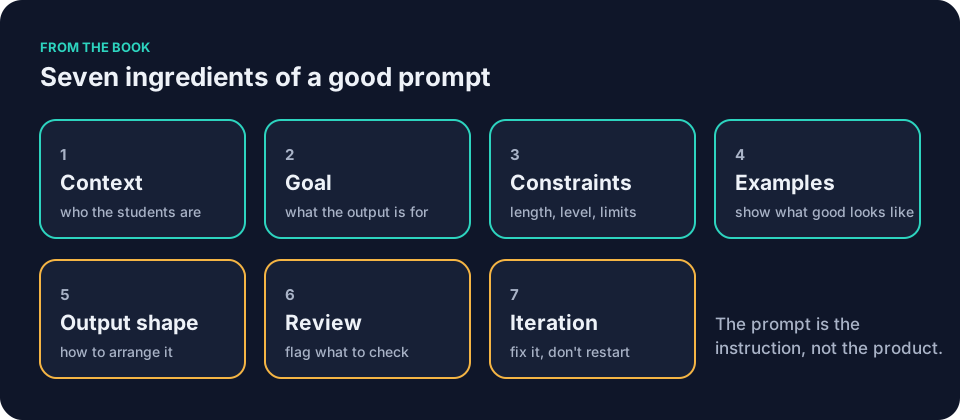
A vague request forces the tool to invent details you already know. AI prompts for teachers need the details Maya left out: what students know, what to produce, and what she will check. They replace guesses with seven ingredients: Context, Goal, Constraints, Examples, Output shape, Review, Iteration. Each ingredient stays short. Together they give you a draft to check against your materials.
What the vague prompt actually asked the tool to do
The short request gave the tool a topic and a genre. It still had to guess the grade level, the exact objective, the prior knowledge, the reading levels in the room, the available materials, the length, the question types, the misconceptions to watch for, and the format that would help Maya check her science first.
Those guesses went wrong in several places at once. The rebuilt prompt supplies details Maya would otherwise leave the tool to guess, but she still checks the draft. It states the seven ingredients in order. You can copy the final block tonight, swap the bracketed slots for your own task, and run it in a general assistant such as ChatGPT, Claude, Gemini or Microsoft Copilot.
The seven ingredients, one at a time
Context
Context tells the tool the setting that changes every answer. List the grade band, the exact topic, what students already learned, and the practical limits of your room. No student names. No identifiable details.
Goal
State the single job and who will use the result. Name your review step and say you want a worksheet draft, not a full lesson plan.
Constraints
Constraints list what must stay out: the exact number and type of questions, the language level, and the items the tool must not add. They feel picky on the first read, but make the draft easier to check.
Examples
Give the tool one clear model in your own classroom voice. One concrete sample item sets the tone, length, and depth; you still check the result.
Output shape
Tell the tool exactly how to arrange the response. A separate answer key lets you check the content first and the student version second.
Review
Ask the tool to flag the spots you must inspect. Treat the flags as a list of possible trouble spots, not as verification.
Iteration
Plan to fix the draft instead of starting over. End the prompt with a line that invites narrow revision requests, one change at a time.
AI prompts for teachers: a worked example in science
Here is the rebuilt prompt that contains all seven ingredients. It is a template. The bracketed slots hold Maya’s actual values when she runs it: fifteen minutes, eight retrieval questions, eighth grade, and the three facts about thermal energy her class has already verified. Copy it tonight and edit the slots for your own task.
You are helping a [grade level] teacher draft classroom materials.
Context:
- Topic: [topic]
- Learning objective: [objective]
- Content already taught: [verified content, such as thermal energy transfers from warmer objects to cooler ones; cold is not a substance that moves; when a substance warms without changing state, its particles move faster on average]
- Class condition: [class condition, such as mixed reading levels]
- Available materials: [materials]
Goal:
Draft a [time limit] [task type] that I will review before students see it.
Constraints:
- Use plain language at a [grade level] reading level.
- Include exactly [number] short retrieval questions, one short-response question about [concept], and a two-question exit ticket.
- Do not add homework, extensions, a full lesson plan, extra diagrams, invented standards, citations, labs, or student information.
- Keep every scientific statement within the facts listed above.
Examples:
Use familiar classroom objects such as a mug, spoon, table, or cold pack. Include at least one item that surfaces the common misconception that cold moves from one object to another.
Sample item:
A metal spoon sits in a mug of hot cocoa. After a minute, the spoon feels warm. Which statement explains what happened?
A. Cold moved from the spoon into the cocoa.
B. Thermal energy moved from the cocoa into the spoon.
C. The spoon created its own heat.
D. The cocoa stopped moving.
Output shape:
1. Student-facing success criteria
2. Student worksheet with numbered items and space to write
3. Teacher-facing note on one likely misconception
4. Separate answer key
Review:
Flag any scientific statement, answer, or wording I must verify against my own materials. Identify any item with more than one defensible answer. Do not declare the draft ready for students.
After drafting, wait for my revision requests.
Maya pastes the block into the general assistant and receives a first draft. She corrects one factual slip, removes a duplicate question, and adjusts the exit ticket so it asks students to explain rather than fill in a blank. She checks the science against her own materials.
When she finds a weak item, she sends a narrow revision request.
Rewrite question [number] so only one answer is defensible. Leave everything else unchanged.
She saves the prompt in a plain text file next to the worksheet. The next time she needs questions on a different topic she opens the file, updates the context and facts, and runs it again. The structure stays the same. The output shape, the restrictions, and the review checks may change too.
AI prompts for teachers: a worked example in social studies
The same seven headings work for Frank Bell’s tenth-grade unit on the causes of the Civil War. His vague version was shorter than Maya’s:
Give me discussion questions on the Civil War.
Say the first draft gives Frank twelve generic prompts, half of which assume students have already read a textbook chapter Frank skipped, and one that treats a contested claim as settled fact. He catches the errors because he knows his sources.
Frank’s rebuilt prompt keeps the seven headings but changes the context, the output shape, and the checks. His context names slavery and its expansion as central to the causes and lists the two documents students have already read. His goal is a set of discussion prompts for a 20-minute seminar, not a worksheet. His output shape asks for six sequenced questions plus one teacher note on common oversimplifications. His review line asks the tool to flag any claim that goes beyond the listed sources.
You are helping a tenth-grade social studies teacher draft discussion materials.
Context:
- Topic: causes of the Civil War, with slavery and its expansion as central
- Documents students have read: [two primary sources]
- Class condition: [mixed reading levels, 20-minute seminar]
Goal:
Draft six discussion questions I will review before class.
Constraints:
- Sequence questions from recall to analysis.
- Stay within the listed documents and the causes we have examined.
- Do not add a quiz, an answer key, homework, or invented quotations.
Examples:
One sample question in my voice: [sample question]
Output shape:
1. Six numbered questions
2. One teacher note on a common oversimplification
Review:
Flag any claim that goes beyond the listed sources. Identify any question with only one obvious answer.
After drafting, wait for my revision requests.
Frank runs the prompt once, checks each question against the specified documents, and trims two items that overlap.
AI prompts for teachers: a worked example in elementary math
Jordan Kim teaches fourth grade and needs a short practice set on two-digit by one-digit multiplication. The vague version was one line:
Make some multiplication problems.
Jordan might get twenty problems, half of which require regrouping skills the class has not yet covered, and an answer key with two arithmetic errors. Jordan checks the math and spots the mistakes before copying.
Jordan’s rebuilt prompt keeps the seven headings but narrows every slot. The context lists the exact strategies students have practiced: partial products and the area model. The goal is a ten-minute practice set Jordan will check before copying. The output shape asks for eight problems, space to work, and a separate answer key.
You are helping a fourth-grade teacher draft math practice.
Context:
- Topic: two-digit by one-digit multiplication
- Strategies already taught: [partial products, area model]
- Class condition: [students still building fluency with basic facts]
Goal:
Draft a ten-minute practice set I will review before students see it.
Constraints:
- Include exactly eight problems.
- Use only the strategies listed above.
- Do not add word problems, homework, or a full lesson plan.
Examples:
One sample problem in my voice: [sample problem]
Output shape:
1. Student worksheet with numbered problems and space to work
2. Separate answer key
Review:
Flag any problem that requires a strategy not listed. Identify any problem with more than one reasonable interpretation.
After drafting, wait for my revision requests.
Jordan runs the prompt, checks each problem against the strategies listed, and rewrites one item that assumed fluency with a fact family the class is still practicing. The answer key gets the same check against Jordan’s own work, not the tool’s confidence.
Checking the worksheet and answer key before use
Before any student sees the draft, run a short check. Read the student-facing version first, as a student would. Mark anything that assumes knowledge you have not taught.
Then read the answer key against your own materials, not against the tool’s confidence. For Maya’s worksheet that means confirming each answer matches the three facts her class verified. For Frank’s questions it means confirming no prompt assumes a source students have not read. For Jordan’s math set it means working each problem yourself.
Next, hunt for items with more than one defensible answer. The instruction may surface trouble spots; check the whole draft even if it flags none. A flag you did not get is still your problem.
Last, read the teacher-facing note. If the tool names a misconception you have never seen in your room, delete the note rather than teaching to it.
Saving and reusing AI prompts for teachers
Jordan Kim uses a shorter version for comment feedback on fourth-grade math exit tickets. The context lists the three recurring misunderstandings from the last quiz. The goal asks for three sentence starters in Jordan’s own voice. Constraints rule out any mention of identifiable student grades or names. Jordan checks the school’s policy and obtains permission before pasting any anonymized student work, then checks tone and decides which comments go home.
Denise Carter in the front office adapts the structure for absence notes. Context includes the exact policy language required by the district. Goal is a short, neutral message with the required next steps easy to find. Output shape is a single paragraph plus one bullet list of next steps. Denise checks every note before she sends it.
The tool drafts. You check timing, level, and accuracy. You decide what reaches students. That is the book’s Draft, Check, Decide rule, and it keeps the work yours.
If you want ready-made starting points, the site’s prompt library for teachers groups more prompts to adapt by task, each in a code block with bracketed slots and one line on what to check. For a closer look at good requests versus bad ones in a general assistant, see ChatGPT for teachers: what to ask it and what to check.
Common mistakes with AI prompts for teachers and how to fix them
A common mistake with AI prompts for teachers is burying the context at the end. Put the grade, topic, and prior knowledge near the start so your request is easy to inspect and reuse.
Another mistake is treating the first output as final. The prompt ends with an iteration line on purpose. Ask for one narrow revision, then check that the rest stayed intact. Broad requests such as “make it better” tend to rewrite everything and reintroduce errors you already fixed.
Many teachers also skip the review instruction. Without it the tool may bury a factual slip inside a long paragraph. The instruction may surface trouble spots; check the whole draft even if it flags none.
Some prompts grow too long. If yours repeats the same directions in three places, cut the repeats and keep the facts, the restrictions, and the required format.
Finally, some forget to name the decision point. A goal that says only “create a worksheet” invites the tool to decide difficulty and length. A goal that says “draft a worksheet I will review before students see it” keeps the decision where it belongs.
A step-by-step routine you can start tonight
Open a blank note. Write the seven headings in order. Fill each one with the details already in your head. Keep every fact inside the green zone: no student names, identifiable student work, or individual grades.
Paste the full prompt into your school-approved general assistant. Read the entire draft once. Check every scientific, historical, or mathematical claim against your own materials. Adjust the items that miss the mark. Send one revision request at a time.
When the version satisfies you, copy the final prompt into the same note. Add two lines at the bottom: the date, the topic, and the two changes you made. Save the file. Next week you will open it, change the context and the verified facts, and run it again.
For a ten-minute start, choose one low-risk task and save a first version of the prompt. Give the draft the review time it needs. The routine scales to any of the five things AI can actually help with: draft, understand, adapt, create, or organize. Start from your objective and what students already know. Let the tool produce a first version. Check timing, level, and accuracy before you decide.
AI prompts for teachers work in a general assistant such as ChatGPT, Claude, Gemini or Microsoft Copilot. A document-grounded tool such as NotebookLM answers only from documents you give it. A teacher-specific tool such as MagicSchool or Brisk walks you through common classroom tasks. Tools and their settings change, so check your school’s current guidance before you paste anything. The prompt is the instruction, not the product. The worksheet, the message, or the quiz stays yours.
Questions teachers ask
How long should AI prompts for teachers be?
Long enough to remove the guesses. Maya’s runs about two hundred words. Frank’s runs shorter because his constraints repeat from week to week. Test yours on one low-risk task. If the first draft still invents too much, add one more constraint or one more example.
Can I use the same prompt for every subject?
Yes, after you update the context and the verified facts. Keep the seven headings, but change the output shape and review checks to suit the subject and task. A worksheet needs a separate answer key. A seminar needs sequenced questions.
What if the tool still gets a fact wrong?
Check it against your own materials and rewrite that item yourself. The review instruction simply surfaces the spot. It never replaces your judgment. Follow your school’s policy on any high-stakes decision.
Should I save every prompt I write?
Save the ones you run more than once. A plain text file or a dedicated notebook page works. Add a short note on what you changed last time. Keep the structure, but check and update it when the task or tool changes.
Where does this fit with lesson planning?
The prompt handles one task inside the larger job of planning a period. If you want the full workflow, from objective to checked draft, using AI for lesson planning without losing the lesson follows Maya’s energy-transfer lesson through the same steps.
What about school-level rules?
Generic planning is green. Ask the school before you use yellow material, including anonymized student work. Red material stays out of any tool your school has not approved. For schools writing their own guidance, the TeachAI, AI Guidance for Schools Toolkit is a free toolkit to help schools write AI guidance. OpenAI also publishes example prompts in its OpenAI, Teaching with AI guide for educators.
The book Keep It Simple: AI for Teachers devotes a full chapter, The Prompt Is the Instruction, Not the Product, to these seven ingredients and the habits around them. The free sample on this site contains that chapter along with the first three.
Open a new note tonight. Paste the first code block above. Replace the context and facts with the topic that is actually eating your time. Run it once. Check the draft against your own materials. Save the filled-in version for the next low-risk task.