Say Maya Rodriguez sits down at 6:45 p.m. with a blank plan for tomorrow’s eighth-grade science class. Her objective is already written at the top: students will explain why energy moves from a hot object to a cold one, using a particle model. Everything else is empty space.
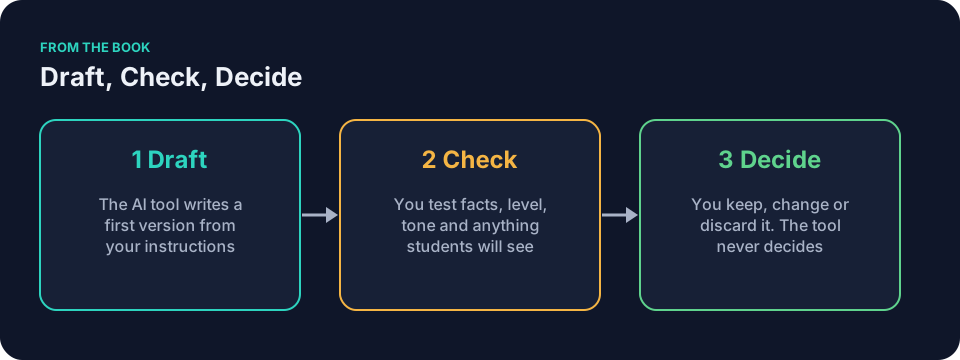
A general AI assistant such as ChatGPT, Claude, Gemini or Microsoft Copilot can draft the period. You check it. You decide what reaches students. The tool never decides. The longer version of this loop, with Maya’s lesson as the running example, sits in Using AI for lesson planning without losing the lesson.
This piece gives you a printable AI lesson planning checklist. Run it on one low-risk lesson tonight. The same pattern appears in The teacher’s AI checklist: before, during and after for any classroom task.
Before you open the tool
Decide the color of every fact before anything is pasted. Green information, like a generic objective or public facts, can go in. Yellow information, like anonymized student work, needs a yes under your school’s policy first. Red information never enters a tool your school has not approved.
- Write your real objective in one sentence, the way Maya did.
- List the prior knowledge students actually bring, such as “particles move faster when heated” from last week.
- Write the exact minutes you have, including the five the announcements will steal.
- Note the materials already in your room.
- Confirm nothing red is in the text you plan to paste.
- Gather one example of the style you want, such as a generic old plan with no student information. Check your school’s policy before pasting anything else.
- Run through the prompt ingredients: Context, Goal, Constraints, Examples, Output shape, Review, Iteration.
Tools and their settings change, so check your school’s current list before you assume a tool is approved.
The prompt is the instruction, not the product. A vague request makes the tool guess at grade level, reading load, and common errors. A prepared block cuts those guesses.
You are a lesson planning assistant. My objective is [objective]. My students already know [prior knowledge]. I have [minutes] minutes. Available materials: [materials]. Constraints: [constraints]. Output a lesson plan with [output shape, e.g., a warm-up, two activities, and an exit ticket], with a timing breakdown by activity and a column for teacher notes on common misconceptions. Mark any detail you cannot support from what I gave you with [CHECK] so I can review it.
When the draft arrives
Paste the prepared block. Ask only for a draft. Keep the request narrow. Fifteen ready prompts grouped by task sit in A prompt library for teachers: 15 prompts to copy tonight.
The [CHECK] marker is a flag for you to review, not a guarantee the tool caught everything. You still verify the plan yourself.
AI can draft, understand, adapt, create, or organize. For lesson planning the tool drafts. You supply the objective, the prior knowledge, the time, and the available materials.
- Confirm the draft matches the output shape you requested.
- Note the total minutes the draft claims.
- Circle every [CHECK] flag the tool inserted.
- Mark any section that looks like a placeholder or a guess.
When you review the draft
Open the plan beside your own notes and the textbook page you trust. Read it with a pen.
- Verify every claim against your trusted source. If the draft says heat moves because “cold is absorbed,” that explanation fails and gets rewritten.
- Add the timing column yourself. If the activities total 52 minutes and you have 45, mark the overflow.
- Mark any activity that assumes knowledge students do not yet have.
- Confirm the language matches the reading levels in your room.
- Note whether each activity actually advances the objective you wrote.
- Circle every invented standard, resource, or assessment.
Do not edit yet. Just mark what fails. The tool never decides.
When you adapt the plan for your class
Change only what matters. The tool can revise one piece at a time if you quote it and state the exact fix.
- Rewrite any inaccurate explanation yourself, in your own words, from your source.
- Cut or combine activities until the total fits your real minutes. If timing fails, drop the second activity rather than rushing both.
- Add one concrete support tied to the objective, such as a sentence frame for the warm-up: “Energy moves from ___ to ___ because ___.”
- Add one concrete extension tied to the objective, such as asking early finishers to predict what happens when a third object at a different temperature joins the system.
- Adjust the exit ticket so it produces the evidence you need. For Maya: each student explains the direction of energy transfer in one new example.
- Replace any invented resource with one you already own.
Picture a social-studies teacher like Frank Bell. He reviews a draft on the causes of the American Revolution. The tool added a primary-source link to a painting that does not exist. Frank crosses it out and substitutes the actual engraving from his folder. One change keeps the whole period on track.
Final decision before students see it
Read the revised plan once more, as a student would.
- Confirm the objective at the top is still the one you wrote.
- Check the student-facing page for anything that should not appear there: another student’s name, a note meant only for you, a leftover [CHECK] flag.
- Read the directions aloud and rewrite any that are hard to say.
- Decide whether this version is ready for tomorrow or needs one more narrow revision.
- Save the final prompt and your changes for next week.
This AI lesson planning checklist assumes you treat the draft as raw material. Common mistakes include skipping the prior-knowledge line, accepting a timing total that runs long, or leaving a [CHECK] flag visible to students. Fix them by writing the missing line first, trimming one activity, and deleting every flag.
AI lesson planning checklist: a worked example in math
Say Jordan Kim needs a 40-minute algebra lesson on solving linear equations. The objective reads: students will solve one-variable equations using inverse operations and explain each step.
The prompt block contains the exact objective, the fact that students already know how to simplify expressions, the 40-minute limit, paper and whiteboards only, and the request for a warm-up, two guided activities, and an exit ticket with timing.
The draft arrives with a 48-minute total and one example that uses a negative coefficient the class has not seen. Jordan marks both items. He cuts the second guided activity to 12 minutes, rewrites the example with positive numbers only, and adds a sentence starter for the exit ticket. The final version ends at 39 minutes and matches the objective.
Questions teachers ask
How do I make the checklist fit a teacher-specific tool such as MagicSchool or Brisk?
The four sections stay the same. Teacher-specific tools may offer a planning template. Check its fields rather than assume it asks for these details. You still write the real objective first, list prior knowledge, and run every item through the review and adapt steps. The tool drafts. You check. You decide.
What if the draft looks perfect at first glance?
Read it with the textbook open. A fluent draft can still contain a factual slip or one activity that drifts from the objective. The checklist forces the slow second look.
How does this connect to differentiation?
Use the CAST, Universal Design for Learning Guidelines as a framework for planning lessons that work for many kinds of learners. After the tool drafts a single path, add the concrete support and the concrete extension yourself. A sentence frame gives students a way to start writing. A prediction task gives early finishers a reason to keep thinking.
Can I reuse the same prompt block all year?
The structure can be reused. Save the version that worked. Change the objective, prior knowledge, minutes, and materials each time. Constraints, examples, output shape, and the full review may need to change as well.
Does this take more time than planning without AI?
On the first lesson it feels slower. A saved prompt may spare you from rewriting the setup, but the draft still needs a full check.
The book Keep It Simple: AI for Teachers includes a chapter called Your General AI Assistant. The free sample has the first four chapters if you want to see how it reads.
Print the AI lesson planning checklist. Tape it above your keyboard. Tonight pick one low-risk lesson and run all four sections on it, or stop before you prompt.