Picture Jordan Kim at the kitchen table with twenty-seven written responses spread out in front of him. The toast went cold an hour ago. He wants to check whether the same three misunderstandings keep showing up.
He could paste a few responses into a general assistant such as ChatGPT, Claude, Gemini or Microsoft Copilot and ask it to spot patterns. But pasting sends student work to a tool. Before Jordan uses student data and AI to look for patterns, he checks what his school permits him to paste.
Your school’s policy decides first. Laws that shape school data rules include FERPA in the United States, the UK GDPR in the United Kingdom, the GDPR in the EU, India’s Digital Personal Data Protection Act 2023 and Australia’s Privacy Act. Read your school’s acceptable-use document before you open any tool.
If you work in the United States, the U.S. Department of Education, Protecting Student Privacy site is the department’s student-privacy resource hub. In the United Kingdom, the UK Information Commissioner’s Office, UK GDPR guidance and resources is the regulator’s guidance hub. Neither replaces your school’s own document.
What counts as identifiable
Identifiable information is anything that could reasonably point back to one student. A first name paired with a last initial often qualifies. So does a student ID, an individual grade or score, an attendance note, a behavior log, an IEP goal, a health detail, or a comment about family circumstances.
Even a distinctive phrase from an essay can identify the writer if the class is small or the detail is unusual. Context matters. A grade level used for generic planning is not the same as an individual grade. Saying “8th-grade science” to get help with a lesson plan is fine. Saying “this student scored 62 on the last quiz” is not.
A piece of work does not need a name on it to be identifiable. Picture a short paragraph about a weekend trip that only one student in your room took. Or an answer that references a local event only a handful of families attended. Removing the name does not remove the risk if the detail still points to one child.
The same rule applies to anything you write about students. A draft email that says “Jamal still refuses to turn in homework” contains a name and a behavior detail. Remove the name, change it to a generic description, and the risk may drop. But only your school can confirm whether the shift is enough.
The Green, Yellow, Red rule
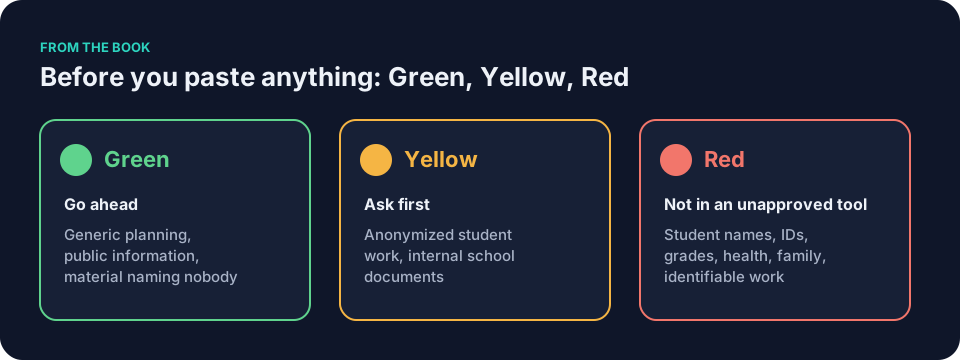
Green describes material with no student data. Use it for generic planning. A topic, a grade band, a standard, a time limit, a broad learning objective. Public information that contains no student details at all. Material you wrote yourself that names nobody. You still need the school’s permitted tool.
Yellow means ask first. Anonymized student work with every name, identifier, and distinctive detail removed. Internal documents with no identifying student information, pending school approval. These cases are not automatically forbidden. They simply require your school’s explicit approval before you paste.
Red means do not enter into a tool your school has not approved for that purpose. Student names. IDs. Individual grades or scores. Attendance records. Discipline notes. IEP or 504 details. Health or disability information. Family circumstances. Any piece of work that could still identify the writer even after light editing.
Red also covers a different kind of risk. Do not ask the tool to assign a final grade, decide a placement, or judge a safety concern. The tool drafts. You check. You decide. Never hand that final call to software. The prompt is the instruction, not the product.
If you cannot tell which color a document is, do not paste it. Treat possible identifying information as Red and ask your school.
student data and AI: a worked example in science
Say Maya Rodriguez faces a stack of exit tickets on energy transfer. She has taught eighth-grade science for twelve years. Three classes show the same misconception. Cold moves from one object to another. She wants to see the pattern without sending names or full paragraphs into a tool.
She picks three tickets at random. Each one carries a detail that could trace back to one student. One mentions a family trip to the mountains. Another uses a phrase only one child in the room writes. A third includes a score from last week’s quiz.
Maya applies the Green, Yellow, Red rule. The full tickets sit in the Red zone. She cannot paste them. Instead she edits each one down to its core scientific claim. She removes every personal reference. She keeps the three cleaned versions separate from the names.
The result stays Yellow. She still asks her school first. Once approval arrives she pastes only the cleaned text into the approved tool. She adds a line that explains the task, but she still checks every claim the tool returns.
You are helping a teacher look for patterns. Here are [number] student responses about [topic] with identifying details removed. If the responses show common misunderstandings, list them. For each one give a one-sentence clarification a teacher could use in feedback. Use only the text below.
[Cleaned student responses pasted here]
The tool returns a draft list. Maya checks every item against her own stack. She discards what does not match her students. She writes the final feedback herself. The students receive comments that still sound like her. See the full workflow in AI for student feedback that still sounds like you.
How to anonymize before pasting
Start with the original piece. Read it once for anything that could point to one child. Names go first. Then any detail tied to a single family, a unique trip, a local event, a distinctive voice, or an individual score.
Replace proper nouns with placeholders or remove them. Cut references to uncles, cousins, or specific weekends. Keep only the idea the student expressed about the topic.
Here is a before-and-after that keeps the academic idea intact. Before: “I think the cold from the ice cube moved into my hand when we visited my grandmother in Duluth last winter.” After: “I think the cold from the ice cube moved into my hand.” The student’s claim about energy transfer survives. The family trip does not.
Read the cleaned version again. Ask whether a colleague who knows your class could still guess the author. If the answer is yes, edit once more. When the text passes that check, confirm two things. First, that your school’s policy permits this specific use. Second, that the tool is approved for this kind of student work. If either answer is no, stop.
Run this pre-paste check before you open the tool. No names or initials. No IDs, scores, or dates tied to one student. No family details, locations, or events that narrow to one child. No distinctive phrasing a colleague would recognize. School approval confirmed for this use. Approved tool confirmed.
Sometimes meaningful anonymization is not possible. A personal narrative about a family’s immigration story loses its purpose if you strip the family out. Do not force that piece into an AI prompt. Read it yourself, or ask a colleague to read it with you.
You are helping a teacher plan a review session. The topic is [topic] for [grade band]. Suggest three short activities that address a common misconception about [concept]. Do not ask for student work.
[No student data needed]
student data and AI in a social studies department
Frank Bell is a veteran social studies teacher. He has a pile of short essays on colonial grievances. He wants to organize common themes without sending full student writing into a tool.
He selects five essays. Some contain a local reference only a few families would know. He removes those sentences. He strips every name and pronoun that could tie the text to one writer. He keeps the historical claims about taxation and representation intact.
The cleaned paragraphs now sit in the Yellow zone. Frank checks the department’s approved list of tools. He confirms the policy allows anonymized student work for pattern spotting. Only then does he paste.
He uses this prompt.
You are helping a social studies teacher organize student ideas. Here are [number] anonymized paragraphs about [topic]. Group them into common themes. For each theme list two clarifying questions a teacher could ask in class. Stay within the provided text only.
[Cleaned paragraphs pasted here]
The tool returns grouped notes. Frank reads them against the originals. He discards two suggestions that do not fit his unit. He keeps the rest as a starting point for tomorrow’s discussion.
student data and AI for elementary writing
Picture a third-grade teacher with twenty-one short stories about family traditions. Several stories mention a recent move or a grandparent’s accent. Those details make the pieces Red until they are edited.
The teacher removes every proper name. She keeps the sequence of events and the descriptive details that show writing skill. She checks each cleaned story for anything that might still point to one child in a small school.
Removing names and doing a colleague check reduces risk. It does not prove the stories cannot identify their writers. The teacher asks the principal for approval before anything leaves her laptop. She confirms the school approves both the anonymized work and the specific tool for this task. With a yes she pastes the set into a teacher-specific tool such as MagicSchool or Brisk. She adds context about grade level and writing goal but no individual scores.
The tool drafts a list of common strengths and areas for growth. The teacher checks the list against her own observations. She writes the final comments in her own voice.
Common mistakes and how to fix them
A common mistake with student data and AI is treating a removed name as enough. The detail about the family farm or the exact score still travels with the text. Fix it by stripping every unique marker and reading the result with fresh eyes.
Another mistake is assuming every tool is safe because it claims to be private. A document-grounded tool such as NotebookLM still follows your school’s rules on what you may feed it. Tools and their settings change. Check the current policy each term.
A teacher might feel tempted to paste an entire gradebook column to save time. Do not paste a gradebook column into an unapproved tool, and follow school policy even when a tool is approved. Replace it with a planning request that carries no student data.
You are helping a teacher plan a ten-minute reteach for [grade band] [subject].
From my own notes, part of the class [describe the misconception in your words, no student work].
Suggest two short activities that expose that misconception and one exit question that checks it.
Do not ask me for student work or names.
The exact list of names and scores stays out. The model drafts. You check every claim against the originals. You decide what reaches students.
When the Yellow request is not approved
Say a science department asks whether teachers may paste anonymized lab reports into the school’s assistant, and the answer comes back no. That settles the Yellow question for now. It does not stop the planning.
Picture Maya reading the lab reports on her own first. She notices that many of them get the direction of energy transfer backwards. She writes that pattern down in her own words on a sticky note, with no student wording and no names. Then she checks that her school allows a generic planning prompt like the one below before she uses it.
You are planning a ten-minute reteach for eighth-grade science.
Several students in my class think cold moves from ice into a hand. The correct idea: thermal energy transfers from the warmer hand to the colder ice.
Draft two short demonstrations and one exit question that would show whether students still hold the misconception.
She checks the science in each draft against her textbook before she uses any of it. The student work never leaves her desk. If the policy changes later, the department can ask again; until then, the teacher-written summary does the job.
Tools do not change the rule
A document-grounded tool such as NotebookLM answers only from documents you give it. That does not remove the need for approval. The material you supply still has to be allowed.
A teacher-specific tool such as MagicSchool or Brisk walks you through common classroom tasks. That does not change the school’s rules about what may be entered, and the same holds for student data and AI tools of every kind.
Your own data matters too. AI privacy for teachers: settings and habits that protect you covers personal versus school accounts, chat history, training settings, and the danger of screenshots that capture student names.
House rules that reinforce the boundary
A department could adopt a one-page set of norms so everyone speaks the same language. Disclose when you use AI. A human makes every decision. Verify every fact. Protect all data. Keep access fair.
They also address bias. Koushik Deb’s research at IIIT Kalyani examines how models behave across English, Hindi, and Bengali. Add a reminder to check AI-generated material for bias, including across languages. You can adapt the version in Responsible AI in the classroom: a short set of house rules.
The Green, Yellow, Red rule and the Draft, Check, Decide habit run through Keep It Simple: AI for Teachers.
Questions teachers ask
Can I paste a rubric that includes last year’s class averages?
A generic rubric with criteria and performance levels is usually Green. Results tied to students or an identifiable class are different. A class average without names may still reveal something in a very small class. Check the context and your school’s policy before entering it.
What if the tool is hosted on my district server?
The policy still decides. A district-hosted tool is not automatic permission. Check whether your school approves that tool for this data and this task.
How do I explain this to parents?
Tell them the class follows the school’s policy on student data and AI. If it is true for you, add: “I review any AI draft I use and make the final decision.” Point them to the school office for the full policy.
Does the rule apply to images of student work?
Yes. A photo of a worksheet with a name or distinctive drawing can identify a student. Crop or redact before you consider pasting, and check the entire image after cropping or redaction. Treat the original photo as Red until it is cleaned.
Can I use student data and AI to write an IEP goal?
Identifiable IEP details must not go into an unapproved tool. A generic drafting task is separate. You may ask the tool to draft language from approved templates, subject to school policy. Staff check the draft against official guidance and make the final decision.
One concrete next step
Open your school’s acceptable-use policy tonight. Find the section on third-party tools and student data. Mark the tools already approved for classroom use. Draft one Green prompt for a task with no student work, such as planning a lesson outline. If you have been considering a Yellow task, such as reviewing a set of exit tickets, confirm with your school whether anonymizing and pasting is allowed for that task before you proceed.