Jordan Kim sets the stack of papers beside a plate of toast gone cold. Twenty-seven responses. The same three misunderstandings keep surfacing. At 8:12 p.m. the comments still need writing, and tomorrow’s classes start at 7:45.
AI for teacher feedback begins with your own reading. You mark the papers first. The tool never sees them. It only receives the patterns you already noticed, written in your words, with no names attached.
Jordan’s tally gives him three patterns, and the tool turns those patterns into a small bank of draft comments. He still checks every line against the paper in front of him before a student reads a word.
Finding patterns across a class set
Jordan reads all twenty-seven responses the way he always does. Pen in hand. He keeps a tally on a sticky note with no names. Just marks.
By the ninth paper the shape appears. By the twenty-seventh she can state the gaps plainly. She teaches tenth-grade history. Her students wrote a short response on the political fight over slavery in the territories and the admission of new states. They had to use evidence from the assigned source.
She lists the three gaps in her own words.
Students describe regional economic differences but do not explain how the assigned source connects slavery’s expansion to the political dispute.
Students quote the assigned source but do not explain how the quote supports their answer.
Students name the conflict over slavery in the territories but stop there, without explaining what made it a breaking point.
Now the tool can sharpen that list. Open a general AI assistant such as ChatGPT, Claude, Gemini or Microsoft Copilot. Paste nothing that names a student. The tool never saw the papers, so it cannot count or classify anything. It can only organize what you already found. That is the ORGANIZE move from the five things AI can actually help with.
A complete prompt might read as follows. Notice the bracketed slots. Replace them with your own subject, your own class size, your own gaps. Never copy a worked example’s details into your prompt as if they were yours.
Context: I teach [grade and subject]. Students wrote a short response on [the question or task], using evidence from [the assigned source or material]. I have read all [number] papers and found the same [number] gaps.
Goal: Help me refine my descriptions of the gaps so I can plan tomorrow’s reteach and write feedback comments.
Constraints: Use only the gap descriptions below. Do not invent new categories. Do not count or classify responses; I already did that.
Examples: Gap 1: [your first gap, in your words, no student names]. Gap 2: [your second gap]. Gap 3: [your third gap].
Output shape: [number] short descriptions of typical errors, each under twenty words, followed by one reteach suggestion per gap.
Review: flag any wording that sounds too technical for a [grade level] student.
Iteration: after your first answer, I will tell you which gap matters most and ask you to expand that one.
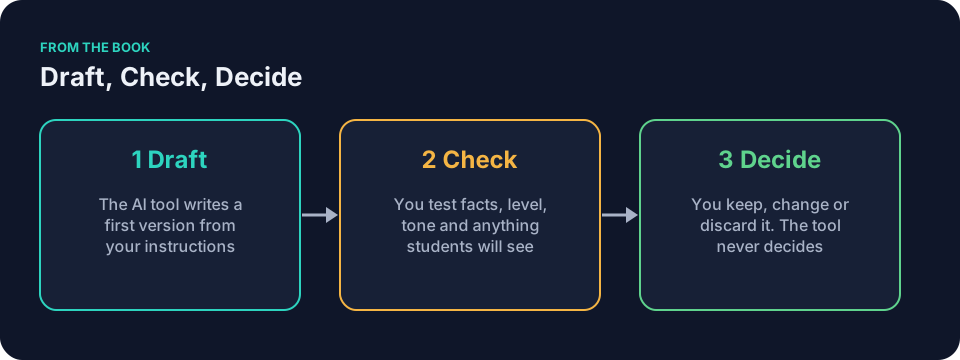
The tool drafts a tidy version. Jordan checks the wording against his own reading and his sticky note. He decides which gap gets ten minutes of class time tomorrow.
After the tally, Jordan does two more things before he opens any tool. He rereads his three gap sentences and deletes anything that could point to one student. Then he asks himself a harder question: does this pattern call for feedback, or for reteaching?
When the pattern calls for reteaching, not another comment
Sometimes the sticky note tells you the comment is the wrong tool. If twenty of twenty-seven students missed the same idea, writing twenty individual comments about it is slow penance. The misunderstanding lives in the class, not in the individual papers.
Jordan’s first gap is like that. Most of the class described regional economic differences without explaining how the source connects slavery’s expansion to the political dispute. No sentence in the margin fixes a gap that wide. So tomorrow he reteaches it in ten minutes: a teacher-written example, rebuilt on the board, with the missing connection added out loud.
The comment bank still earns its keep on the other two gaps. Those show up in smaller clusters, and a short written nudge fits. AI for teacher feedback works best when you let the tally make this call. Reteach what the whole class missed. Comment on what smaller groups missed. The tool can draft for both, but only you know which is which.
A quick way to decide: if you would write nearly the same comment on more than half the papers, plan a reteach instead. If the gap appears in a handful of papers with different shapes each time, write the comment.
AI for teacher feedback: building a comment bank
Once the patterns are clear, ask the same tool to draft short comments that address each one. Keep the request narrow. Supply two or three comments you have written in the past so the tool matches your tone instead of guessing. Before you paste those old comments, strip out anything that names or describes a real student. Confirm your school’s policy and the tool’s approval first, because an old comment can still carry a recognizable detail.
Here is the prompt Jordan uses to build his bank. It carries his three teacher-written gaps, one anonymized example of his tone, a requested number of short drafts, and an instruction not to invent source details.
Context: I teach [grade and subject]. Students wrote a short response on [the question or task], using evidence from [the assigned source]. I read all [number] papers and found [number] repeated gaps.
Goal: Draft short feedback comments I can adapt for individual papers.
Constraints: Use only the gaps below. Match the tone of my example comment. Keep each comment three sentences or fewer. Name what the student did, then the gap, then one concrete next step. Do not invent quotes, page numbers, or details from the source; I will check every reference myself.
Examples: Gap 1: [first gap in your words, no names]. Gap 2: [second gap]. Gap 3: [third gap]. Example comment in my voice: [one comment you have actually written, with student details removed].
Output shape: [number] draft comments per gap, each ready to adapt.
Review: flag any line that could sound generic or discouraging.
Iteration: if the tone feels off, I will give you one revised example.
The output is a starting bank. Jordan keeps the entries that feel like him, rewrites the rest, and discards anything that does not match his classroom.
Here is what the revision step looks like in practice. The tool drafts: “Your response demonstrates insufficient evidentiary linkage between economic conditions and the political dimensions of the slavery debate.” Accurate, maybe. Usable, no. Jordan rewrites it as: “You described the regional differences. Now connect them to the political fight over slavery in one sentence.” Same meaning, his voice, plainer and easier to act on.
After his edits, a small bank for Jordan’s three gaps might look like this.
For gap 1: “You described how the regions’ economies differed. Now add one sentence explaining how the assigned source connects slavery’s expansion to the political dispute. Find a detail in the source that helps explain the connection.”
For gap 2: “You found a strong quote. After it, tell me in your own words what it proves about your answer. One sentence is enough.”
For gap 3: “You named the conflict, which is the right start. Go one step further: explain what made slavery’s expansion into the territories a breaking point. Use one detail from the source to support your point.”
Each comment names what the student did, then points to a specific revision. That is what makes a bank entry worth saving. And before Jordan pastes that first comment anywhere, he checks the source himself to confirm which detail actually supports the connection. The tool suggested the move. He verifies it against the real text.
Selecting and personalizing an entry against one paper
With AI for teacher feedback, a comment bank gives you a draft to test against each paper, not a sentence to paste across the class. The bank entry is a starting shape. The paper in front of you decides the final sentence.
Take one of Jordan’s students. His response names the territorial conflict and quotes the source, but the quote sits there doing nothing. Jordan opens his bank and copies the gap 2 entry: “You found a strong quote. After it, tell me in your own words what it proves about your answer.”
Then she reads his actual paper. His quote is not strong; it is the wrong one, a line about tariffs rather than slavery. So the bank entry bends. Her final comment reads: “You quoted the source, which is the right instinct. This quote is about tariffs, though, and your point is about slavery. Find the line where the source addresses slavery directly, quote that, and tell me in your own words what it proves.”
Three sentences. The bank gave him the skeleton; the student’s paper gave her the specifics. Another student with the same gap 2 pattern gets a different version, because her quote is apt but unexplained. Jordan writes: “Strong quote. Now tell me what it proves. One sentence in your own words, right after it.”
Same bank entry, two different comments, both true to the papers. That is the check that matters: read each drafted comment against the individual student’s actual work before it goes anywhere. If the comment does not match what the student really wrote, rewrite it until it does.
Keeping the human voice
Every comment that reaches a student must sound like the teacher who knows that student. The Draft, Check, Decide rule applies here without exception. The tool drafts. You check for accuracy, tone, and fairness. You decide the final wording.
A common mistake with AI for teacher feedback is letting the tool’s politeness set the tone. Machine politeness drifts toward filler: “Great effort, but consider strengthening your analysis.” That sentence gives a student no clear revision to make. Your voice is plainer. “You did the hard part. One more step.”
Read each suggested comment against the actual paper it will accompany. Does it address the specific evidence the student gave? Does it name a strength before a gap? Does it leave the next step obvious? If the answer is no on any count, rewrite it. The tool never decides what a student hears.
A practical test: read the comment out loud. If you would not say it across a desk during a conference, do not write it on the paper. Some drafts will fail this test. Rewrite them before a student sees them. The tool gives you raw material, not a finished product, because the prompt is the instruction, not the product.
AI for teacher feedback rests on a clear idea of what feedback is for. For a broader frame, read the Education Endowment Foundation, Teacher Feedback to Improve Pupil Learning, a guidance report on classroom feedback. Your own rubric and your knowledge of the class still come first.
Data rules before pasting anything
Before you paste anything, apply the Green/Yellow/Red rule. The page Student data and AI: what never goes into the prompt spells out the definitions in plain terms and shows how to anonymize a piece of work.
Green means generic planning and public information. A generic description of a misconception belongs in Green: “students often confuse the economic argument with the political one,” written by you, naming nobody. Check your school’s policy before entering anything derived from student work, even at this level, because policies differ.
Yellow means ask first. Anonymized student work, with every name, ID, and identifying detail removed, falls here. Strip the work to its raw pattern, then check your school’s policy and approved tools before you paste. Even after you remove names and obvious identifiers, treat an excerpt as Yellow and check before you use it.
Red means it does not go in. Do not paste identifiable essays into a tool your school has not approved. Real names, grades, full student essays, discipline notes, or anything that could identify the writer stay out of unapproved tools. A distinctive sentence counts here even with the name cut, because a recognizable line can identify its writer. Send questions about your school’s policy to the front office or the technology lead.
Describing a generic pattern, rather than pasting a student quote, can keep this task in Green. Jordan’s summaries contain no names or quoted work. Before entering even a teacher-written pattern drawn from student responses, check your school’s policy. When you supply example comments so the tool can match your tone, remove student details from those too, and check policy before pasting them.
A document-grounded tool such as NotebookLM or a teacher-specific tool such as MagicSchool or Brisk may offer different features, yet the rule stays the same: know the color before you paste. Tools and their settings change. Check the color every time.
AI for teacher feedback: a worked example in middle-school math
Say Eli Thompson teaches seventh-grade math. The class just turned in exit tickets on fraction division. One ticket asks: “A recipe calls for 3/4 cup of flour per batch. You have 6 cups. How many batches can you make?” The correct answer is 8 batches, because 6 ÷ 3/4 = 6 × 4/3 = 8.
Eli sees the same two misunderstandings across the set.
Students invert the second fraction correctly but forget to multiply.
Students calculate the right number but label it with the wrong unit.
Eli writes those two gaps on a sticky note with no names. Eli opens the general assistant and uses this prompt. The bracketed slots are for your own details.
Context: I teach [grade and subject]. Students completed exit tickets on [skill or topic]. I read all [number] tickets and found [number] repeated gaps.
Goal: Draft short feedback comments I can adapt for each student.
Constraints: Use only the gaps below. Match the tone of the example comment I provide. Keep each comment four sentences or fewer. Name one strength first, then the gap, then one concrete next step.
Examples: Gap 1: [first gap in your words, no names]. Gap 2: [second gap]. Example comment in my voice: [one comment you have actually written, with student details removed].
Output shape: [number] separate comments, each ready to adapt. After each comment, add one sentence telling me what to check when I compare it against the actual ticket.
Review: flag any wording that sounds like it came from a textbook.
Iteration: if the tone feels off, I will give you one revised example.
Say the tool drafts this for the first gap: “You correctly identified the need to invert the divisor; however, the subsequent multiplicative step was not executed, so the quotient remains unresolved.” Eli reads it once and starts cutting. The revised comment, written against a ticket where the student inverted 3/4 to 4/3 and stopped, reads: “You flipped the second fraction, which is the right first move. Now multiply: 6 × 4/3. Finish the calculation and tell me how many batches you get.”
For the second gap, say the tool drafts: “Your arithmetic is accurate, but the unit of the answer does not correspond to the quantity requested.” Eli rewrites it against a ticket where the student computed 6 × 4/3 = 8 but wrote “8 cups” as the answer: “Your calculation is correct. Check the label, though: the problem asks for batches, not cups. Write the answer with the right unit and one sentence about why it makes sense.”
Eli saves both revised comments in a document titled “Fraction Division Bank.” The tool supplied the structure; the tickets supplied the specifics. Notice what the prompt’s Review line does. It asks the tool to mark its own stiff phrasing before Eli has to hunt for it. The check still belongs to Eli. The constraint tells the tool not to add gaps; Eli checks its answer anyway, because a tool that is told not to invent a third gap sometimes invents one anyway.
A worked example in elementary reading
Say a third-grade teacher notices that many students summarize a story by listing events instead of naming the main idea. She writes the pattern with no student names: students list events in order but do not state the main idea in one sentence.
She asks the assistant for three comment variations that fit a calm, encouraging tone, and she supplies one comment she wrote last week with the student’s name and details removed. The drafts arrive. She edits them until each one sounds like something she would say kneeling beside a desk.
Her finished entries are short. “You told me everything that happened. Now tell me what the story is mostly about, in one sentence.” And: “You remembered the ending. What was the big idea the whole story was building toward?”
She saves them in the same document she uses for other subjects. Younger students need shorter comments and smaller next steps, so her Review line asks the tool to flag any word a third grader would not say out loud.
Common mistakes with AI for teacher feedback
A common mistake with AI for teacher feedback is feeding the tool full student essays. Identifiable work does not belong in a tool your school has not approved. Fix it by writing the pattern yourself first, in your own words, with no names.
Another mistake is accepting the first draft without reading it against the actual paper. The comment may sound kind yet miss the exact evidence the student used. Fix it by opening the real work beside the draft and rewriting the sentence that no longer fits.
Some teachers ask the tool to sound more positive. The output becomes vague praise. Fix it by giving the tool one of your own positive comments as an example and requiring the same balance of strength, gap, and next step.
A subtler mistake is building the bank once and using it forever. Students change, and so do your assignments. Fix it by rereading the bank at the start of each unit and cutting any entry that no longer matches how you teach.
Finally, some teachers skip the tally and ask the tool to guess the gaps from a description of the assignment. The tool has not read the papers, so treat any gaps it proposes as guesses. Fix it by reading the papers first. Always.
Questions teachers ask
Can AI for teacher feedback write comments that cite exact quotes from student work?
You can add an exact quotation yourself after drafting a general comment and checking the student’s paper. Do not enter student text into a tool without following school policy. The simpler path is describing the pattern instead of quoting. Your comment can point the student back to their own sentence without the tool ever seeing it.
How long does it take to build the first comment bank?
It depends on how much rewriting and checking the drafts need. Give the tool an example comment in your voice, then allow time to check and rewrite its drafts. Keep the lines you have checked so you can consider them when you build the next bank.
Does AI for teacher feedback work for high-stakes grading?
No. This approach stays in the low-stakes, formative space. For any grade that affects report cards, you read the work yourself and apply your rubric. The tool never decides the score.
What if the tool invents a gap I did not see?
Delete it. The constraint in your prompt tells the tool not to add gaps, but you check its answer anyway. Your sticky note is the source of truth, because it came from the actual papers.
How big should the comment bank be?
Let the assignment’s actual gaps decide. If your tally shows three gaps, draft for three gaps. If it shows five, draft for five. Do not force a fixed number of patterns, and do not pad the bank with comments for gaps you did not see. When a new unit starts, open last term’s bank and copy only the lines that still apply.
What if the pattern points to a bad question instead of a misunderstanding?
That happens, and it is useful information. If several students stumble on the same wording, reread the question and their responses before deciding what to reteach. Rewrite the prompt for next time, and tell this group plainly what you meant.
Where to go next
The same thinking appears in the book Keep It Simple: AI for Teachers, in the chapter Feedback Without Losing the Human Voice. The free sample contains the book’s first four chapters.
Sometimes the pattern you find points to a weak question rather than a weak understanding. When that happens, AI for assessment: better questions in less time shows how to write questions that target the misconception directly, with distractors that reveal thinking and a separate answer key you check yourself.
And before any drafted comment or new question reaches students, run it through the checking routine in How to check AI-generated content before it reaches students. The routine follows Draft, Check, Decide and looks at facts, level, bias, clarity, answer keys, and sources that turn out not to exist.
If you want example prompts from a tool maker’s side, OpenAI, Teaching with AI is OpenAI’s guide for educators using ChatGPT. Read any such guide the way you read a tool’s draft: useful raw material, your judgment on top.
Tonight, pick the three most common misunderstandings you saw in this week’s papers. Write them on a sticky note with no names. Check your school’s policy and the tool’s approval before you open an assistant or enter a pattern or an old comment. If you cannot safely use an old comment, write a fresh tone example yourself. Ask for three comments in your voice. Then read each one against a real paper before it goes anywhere near a student.