At 6:45 p.m. a teacher stares at a blank lesson plan for tomorrow’s eighth-grade science block. Twelve years in the classroom have taught her that a good objective alone does not fill fifty minutes. She needs the sequence, the questions, the timing. Every version she sketches feels either too thin or too packed.
Say that teacher is Maya Rodriguez. She opens the school-approved general AI assistant on her laptop. Instead of typing a vague request, she starts from what she already knows: the exact objective, the facts students covered last week, and the misconceptions she expects to see again. AI for lesson planning starts with those two things, not a request for a complete lesson.
Begin with the objective and prior knowledge
List the learning objective first. Then note what students already know. Without those two pieces the tool guesses grade level, depth, and sequence. With them it has something to work from, though you still check every line it returns.
For Maya the objective reads: students will explain that thermal energy moves from warmer objects to cooler ones and that cold is not a substance that travels. Students have studied how particle motion changes as a substance’s temperature rises. They have not yet connected those ideas to everyday objects such as a mug of coffee or a cold pack from the nurse’s office.
She types those two statements before anything else. The rest of the prompt follows the seven ingredients laid out in How to write AI prompts for teaching: the seven ingredients: Context, Goal, Constraints, Examples, Output shape, Review, and Iteration.
What not to paste into the tool
Before you copy the prompt below, check your school’s policy on student information. Generic planning details are Green: the objective, the topic, the class size, the materials on hand. Anonymized student work is Yellow; ask first. Anything that identifies a particular child is Red. Do not put it into a tool your school has not approved. When in doubt, ask first.
AI for lesson planning: a worked example in science
Say Maya starts with this prompt for her eighth-grade lesson. You can copy it, replace the [bracketed] slots, and adapt it for another lesson by rewriting the topic-specific instructions and example to fit your own objective.
You are helping an eighth-grade science teacher draft a single-period lesson.
Context:
- Objective: [Students explain that thermal energy transfers from warmer objects to cooler ones; cold is not a substance that moves.]
- Prior knowledge: [Students have studied how particle motion changes as a substance’s temperature rises. They have used the terms warmer and cooler but not applied them to everyday heat flow.]
- Class: [28 students, mixed reading levels, 50-minute period.]
- Materials: [whiteboard, projector, student notebooks, paper, printer, no lab equipment.]
Goal: Draft a complete lesson plan I will review before teaching. Focus on retrieval, one hands-on sorting task, and a short exit ticket.
Constraints:
- Total time must add to [50] minutes or less.
- Use plain language at a [seventh-grade] reading level.
- Stick only to the facts above. Do not introduce new standards, vocabulary, or outside sources.
- No homework, no group posters, no videos.
Example: A good sorting card names a warmer object and a cooler object, such as "a room-temperature metal spoon placed in hotter soup," and asks which direction thermal energy initially moves.
Output shape:
- Objective written for students
- Timed sequence of segments with exact minutes
- One sorting activity with cards the teacher can print
- Two-question exit ticket
- Short list of expected misconceptions for the teacher
- Separate answer key for all student-facing questions
Review: Flag any timing that looks unrealistic, any science I must double-check, and any step that assumes materials we do not have.
Iteration: After the draft, wait for my specific revision requests and revise only the parts I name.
A draft comes back in a reasonable shape: five segments, a sorting task, an exit ticket, an answer key. Treat it as a possible plan to inspect, not a finished one.
What to check in the draft
Check timing first
Count the minutes the way you actually teach. Say the draft returns with these segments: opener retrieval, five minutes; direct instruction, twelve minutes; sorting task, fifteen minutes; discussion, ten minutes; exit ticket, five minutes. That adds to forty-seven. Maya adds two minutes for transitions and one minute for settling after the sorting task, and the total reaches fifty.
She cuts the discussion segment by four minutes and moves one retrieval question into the opener. The final sequence reads: opener retrieval, six minutes; direct instruction, twelve minutes; sorting task, fifteen minutes; discussion, six minutes; exit ticket, five minutes; transitions and settling, six minutes. One of the four minutes she took from discussion goes to the opener and three go to transitions, so the room has six minutes to settle. If the sorting task runs long, she drops the second discussion question entirely and keeps the exit ticket.
Check level and accuracy next
Read every sentence students will see. Say one sorting card reads: “A can of cold milk goes into the refrigerator. Which way does thermal energy move?” The proposed answer key says cold moves into the milk. That reinforces the exact misconception the lesson is meant to surface. Maya rewrites the card so it names both objects: “A can of milk at room temperature sits on a shelf in a cold refrigerator.”
The corrected key reads: thermal energy moves from the warmer milk into the cooler air inside the refrigerator while a temperature difference exists. She also notices the cards use the phrase “heat transfer” in one place. That is valid science terminology, but her students have been saying “thermal energy” all unit, so she changes it for consistency with their current vocabulary.
Say two more cards come back. One reads: “A metal spoon at room temperature rests in a bowl of hot soup. Which object gains thermal energy?” The answer key says the spoon gains thermal energy. That matches the science, so she keeps it. Another card reads: “A cold pack sits on a student’s ankle. Which way does thermal energy move?” The answer key says thermal energy moves from the ankle into the cold pack. That also matches, so she keeps it. She prints the three cards and the corrected key.
Then she marks the exit ticket. One item asks students to finish the sentence “Thermal energy always moves from ___ to ___.” The unqualified “always” invites trouble, and the blank rewards copying over thinking. She revises it to: “Choose one sorting card. Describe which object lost thermal energy and which object gained it.” Now the ticket describes the direction of transfer in the lesson’s own examples.
Where your judgment has to take over
No prompt replaces what you know about your students on a given day. Maya knows Period 2 needs an extra worked example on the board before the sorting task, so she adds three lines in the margin. She knows her English learners benefit from sentence starters on the exit ticket, so she writes two starters on a sticky note and attaches it to the printed plan.
The AI lesson planning checklist gives you the exact items to scan: objective alignment, prior-knowledge connection, realistic timing, factual accuracy, differentiation, materials, and the sections only the teacher should change. Print it once. Keep it beside your keyboard.
You can also pull activity ideas from the approaches in AI for classroom activities: getting past the worksheet. Maya keeps the sorting task because it requires students to move cards and talk. The tool suggested it; she confirms it tests the objective instead of simply occupying hands.
Common mistakes with AI for lesson planning
A common mistake with AI for lesson planning is skipping the prior-knowledge step. The tool may assume students already grasp the connection between particle motion and everyday objects. Maya avoids that by stating the exact facts covered last week.
Another mistake is accepting the first draft’s timing at face value. A tool lists ten minutes for discussion without accounting for the time your class needs to settle after a sorting task. Always add your own transition buffers.
Some teachers paste a full unit plan and ask the tool to break it into daily lessons. For your first try with AI for lesson planning, request one period and check it against that period’s objective. The prompt above keeps the scope tight.
A fourth error is treating the output as student-ready. Tools and their settings change. The draft may sound fluent while still containing a subtle inaccuracy, such as an answer key that quietly treats cold as a thing that travels. The teacher must read every line.
AI for lesson planning in social studies
Picture Frank Bell, the veteran social studies teacher. He plans a fifty-minute period on the causes of the American Revolution for tenth graders. His objective is that students will examine the economic effects of the Navigation Acts. They already know the Navigation Acts from last week but have not yet discussed how those acts affected local merchants.
Frank opens the same general AI assistant. He feeds it the objective and prior knowledge first, then adapts the prompt structure. He supplies three verified excerpts from his textbook and asks the tool to build role-play cards only from those passages.
You are helping a tenth-grade social studies teacher draft a single-period lesson.
Context:
- Objective: [Students will examine the economic effects of the Navigation Acts.]
- Prior knowledge: [Students know the Navigation Acts restricted colonial trade. They have not yet examined effects on local merchants or connections to broader unrest.]
- Class: [26 students, varied writing levels, 50-minute period.]
- Materials: [whiteboard, projector, printed textbook excerpts, notebooks.]
- Source excerpts: [Paste three short excerpts from the textbook here.]
Goal: Draft a complete lesson plan I will review before teaching. Focus on retrieval, one short role-play discussion, and a one-sentence exit ticket.
Constraints:
- Total time must add to [50] minutes or less.
- Use plain language at a [ninth-grade] reading level.
- Stick only to the facts above and the supplied excerpts. Do not introduce new events, vocabulary, or outside sources.
- No homework, no full debates, no videos.
Example: A good role-play card gives one merchant’s perspective drawn directly from the supplied excerpts and asks the student to name one economic effect this created.
Output shape:
- Objective written for students
- Timed sequence of segments with exact minutes
- One role-play activity with six perspective cards
- One-sentence exit ticket
- Short list of expected misconceptions for the teacher
- Separate answer key for all student-facing questions
Review: Flag any timing that looks unrealistic, any historical claim I must double-check against the excerpts, and any step that assumes materials we do not have.
Iteration: After the draft, wait for my specific revision requests and revise only the parts I name.
The draft returns with a sequence, six perspective cards, and an exit ticket. Frank checks the minutes, then reads every card against the actual excerpts he supplied. One card describes a merchant who “refused to pay the tax on molasses.” Frank checks the excerpt and finds the passage mentions trade restrictions, not a specific tax refusal. He rewrites the card to say the merchant “objected to limits on foreign markets” and adds a sentence starter for students who freeze during the role play.
A second card describes a merchant who “lost access to all foreign ports.” Frank opens the excerpt and finds the passage lists specific restrictions on certain goods, not a complete loss of access. He rewrites the card to say the merchant “faced limits on which goods could go to which ports” and checks the wording once more against the excerpt before printing.
AI for lesson planning with a third-grade read-aloud
Say a third-grade teacher plans a thirty-five-minute reading block on character traits. The objective is that students will describe a character’s traits using evidence from the text. Students already know the difference between feelings and traits from two earlier read-alouds. They have not practiced pulling direct quotes yet.
The teacher uses a similar prompt with shorter constraints. The tool returns a sequence of read-aloud, paired talk, and exit slip. One question asks students to describe a character from a book the class has not read. The teacher replaces it with a question about the current read-aloud, asking students to find one sentence that shows the character is stubborn.
She checks the answer key against the actual read-aloud text. The key lists a sentence the tool claims shows stubbornness, but when she opens the book, that sentence does not appear. She finds the real sentence on page twelve, writes it into the key, and adds the page number so she can point students to it during the lesson. She trims the paired-talk time from twelve minutes to eight after picturing her students’ attention spans. She makes those changes before using the plan.
A second prompt for targeted revision
Sometimes the first draft is close but one segment misses the mark. Say Maya’s sorting task works, but the discussion questions drift into weather examples that belong to next month’s unit. She sends a short follow-up prompt instead of rewriting the whole plan.
Revise only the [discussion segment] of the lesson you just drafted.
Keep the same objective, prior knowledge, class details, and total time.
Replace the [three discussion questions] with [two new ones] that use only [the mug of coffee, the cold pack, and the metal spoon in soup] from the sorting cards.
Do not change any other segment, the exit ticket, or the answer key.
Flag any new [science] I must double-check.
The tool returns a revised discussion segment. Maya checks the two new questions against her objective and the cards students will hold. She keeps one, rewrites the other to remove the word “heat,” and moves on.
Questions teachers ask
How long should the prompt be?
Specify the objective, the prior knowledge, the period length, the available materials, and the requested output. Add a constraint only when it changes the draft. If a detail does not affect what the tool produces, leave it out.
What if the draft contains an error I miss?
Compare each answer-key claim with the supplied text or your curriculum before printing. OpenAI, Teaching with AI is OpenAI’s guide for educators using ChatGPT, with example prompts. The same rule applies to any general AI assistant: check every line before students see it. Cross-check against your own notes or the textbook page you trust.
Can I use a document-grounded tool instead?
Yes. A document-grounded tool such as NotebookLM can work from documents you provide. Check its answer against those documents. Feed it your prior unit outline and the exact objective. Check the answer against the documents you supplied and your curriculum. You still handle timing and final edits.
Should I switch to a teacher-specific tool?
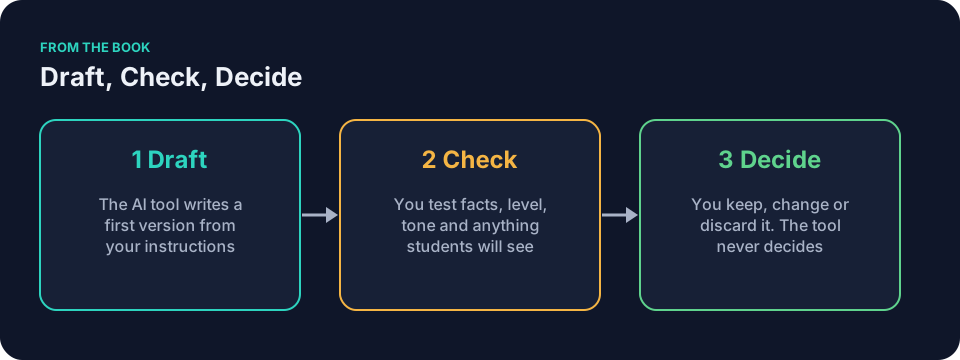
A teacher-specific tool such as MagicSchool or Brisk can walk you through common classroom tasks with ready forms. Those tools still produce drafts. You still check timing, accuracy, and fit. The Draft, Check, Decide pattern does not change.
How does this connect to Universal Design for Learning?
CAST, Universal Design for Learning Guidelines is a framework for planning lessons that work for many kinds of learners. After the tool drafts the sorting task, you decide whether to add sentence starters or a visual anchor chart. Those choices belong to you.
The book behind the approach
Keep It Simple: AI for Teachers uses the Draft, Check, Decide pattern throughout. The chapter “Your General AI Assistant” covers the kind of tool Maya uses. You can read the free sample on this site.
Pick one lesson you must plan tonight and try AI for lesson planning on that one alone. Open the general AI assistant your school has approved. Check your school’s policy before entering any details. Write the objective and prior knowledge first, then fill in the bracketed slots in the prompt above. Give yourself ten minutes on the first version, then stop. Check the draft with the checklist beside you, and change only what needs changing.