Picture Maya Rodriguez at 6:52 p.m. She has a blank lesson plan and forty minutes before she needs to leave. Twelve years of eighth-grade science have taught her that a vague request to a general assistant leaves her with more editing than she has time for.
ChatGPT for teachers is useful for a first draft, provided the request names the class, the task, and the limits. A vague request may produce polished-looking material that needs more editing than you expected. What the teacher needs to specify is the grade level, the length, the exact output shape, and what to leave out.
What a general assistant actually does
A general assistant such as ChatGPT, Claude, Gemini or Microsoft Copilot predicts likely text from patterns. It does not automatically know your curriculum. A confident answer is not verification. That is why the output can sound certain while containing errors. See What is generative AI? A plain explanation for teachers for more on why this matters.
It handles five classroom jobs well enough to be useful. It can draft a first version of a worksheet. It can help you understand a concept by explaining it in plain terms. It can adapt one resource for different reading levels. It can create sample questions or simple visuals described in text. It can organize scattered notes into a cleaner list.
It performs poorly when the job requires current facts, precise alignment to your standards, or decisions about students. Do not delegate grades, placement, or decisions about student concerns to the assistant. Follow your school’s policy and make those calls yourself. The tool drafts. You check. You decide.
Three weak requests rewritten as strong ones
Picture a teacher who needs questions on the water cycle. The weak version reads like this.
Write questions about the water cycle.
The tool guesses grade level, length, and focus. It may produce a crossword, a vocabulary list, or questions about a diagram you do not own.
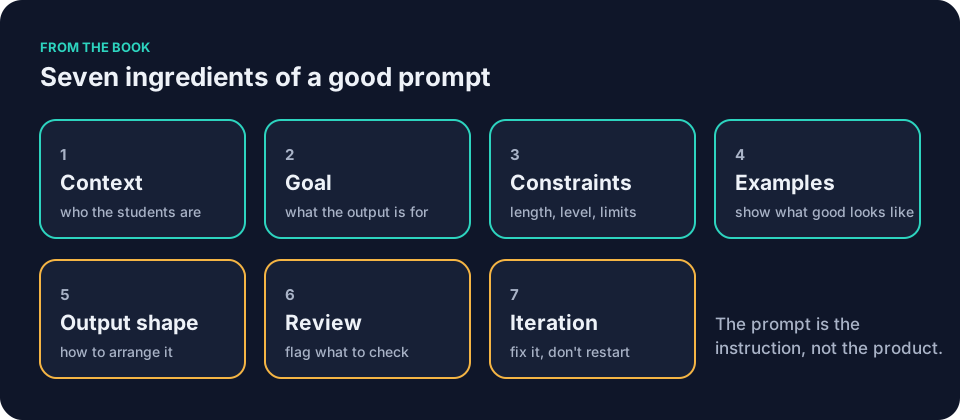
A stronger prompt uses most of the seven ingredients from How to write AI prompts for teachers: the seven ingredients. Here is the improved version, with bracketed slots you can adapt.
You are helping a [grade level] teacher prepare materials.
Context: Students have learned [list the topics or processes]. The class has [describe reading levels or time available]. Use plain language at a [grade level] level.
Goal: Draft a [type of material] I can review before students see it.
Constraints: [Number] short-answer questions only; this limit applies to the questions, not to the answer key or teacher note. No diagrams, no homework, no new vocabulary. Base every question on the topics listed above. Do not add explanations or standards.
Output shape: Number the questions. Provide a separate answer key. End with one teacher note on a common misconception.
Review: Flag any question that could have more than one correct answer.
After you finish, wait for my changes.
The second rewrite targets feedback. A weak request might look like this.
Give feedback on these student answers.
That hands over tone and accuracy to the tool. Before you paste any student work, even anonymized, check your school’s policy. Anonymized responses fall in the Yellow category. Yellow means ask first. If you do not have approval, use invented practice responses instead.
A better version adds constraints and an example.
Context: [Grade level and subject]. Students wrote [describe the task]. I value [what you look for].
Goal: Suggest one specific strength and one specific revision for each of the [number] responses below. I will edit every comment before it reaches students.
Constraints: Use a calm, professional tone. Limit each comment to two sentences. Do not assign a grade.
Example of my voice: "[Paste a sentence or two of feedback you have written yourself.]"
Output shape: List each response by letter, then your two sentences.
Review: Highlight any suggestion that could be misread as negative.
[Paste the responses here only after you have approval, or use invented practice responses.]
Here is what that looks like in practice. Jordan Kim has 27 responses waiting for comments on a short-answer task about ecosystems. He has no approval to paste student work, so he invents three practice responses that sound like his students’ writing. He runs the prompt with those invented responses.
The tool suggests this comment for one of them: “Strong identification of the predator-prey relationship. Revise your second sentence to explain how the energy transfer works, not just that it happens.” Jordan keeps the first sentence. He rewrites the second to say, “Add one sentence that shows where the energy goes when the owl eats the mouse,” because that is how he talks to his students. The tool drafted. He checked. He decided.
The third weak request appears when a teacher wants help organizing notes.
Organize my notes for me.
The same before-pasting check applies. If the notes mention individual students or come from internal documents, clear that under your school’s policy first. If you do not have approval, use invented notes or public information instead. Check school policy before pasting any internal material.
The improved version names the exact shape and limits.
Context: [Grade level and subject] unit on [topic]. These notes mix [describe what is in them].
Goal: Turn the pasted notes into a one-page student reference sheet I can adapt.
Constraints: Maximum [number] words. Use bullet points and one simple table. Reading level no higher than grade [level]. Remove any mention of specific student performance.
Output shape: Title at top, then three sections: Key Terms, Common Mistakes, Quick Review Questions.
Review: Flag any statement you are uncertain about.
Iteration: If the table is too wide, suggest a narrower version without rewriting the whole sheet.
[Paste notes cleared under your school's policy here.]
A teacher with generic notes on the American Revolution might paste bullet points like “Stamp Act 1765, colonists protested taxes, Boston Tea Party 1773, Intolerable Acts, First Continental Congress 1774, Lexington and Concord 1775.” The tool returns a one-page outline with Key Terms (Stamp Act, Intolerable Acts, First Continental Congress), Common Mistakes (confusing the Boston Tea Party with the Boston Massacre, thinking the Revolution started in 1776), and Quick Review Questions (three short prompts).
The teacher reads each line, checks the dates against the class textbook, and changes “Intolerable Acts” to “Coercive Acts” because that is the term her textbook uses. She adds a note to herself that the sheet needs a line about the Declaration of Independence before she prints it.
In each case the prompt supplies the details the tool would otherwise invent. The prompt is the instruction, not the product.
ChatGPT for teachers in a fifth-grade classroom
A fifth-grade teacher at 7:10 p.m. needs a simple activity on fractions. The weak prompt she once used read, “Make a fractions worksheet.” The draft came back with word problems about pizza that her students had seen too many times. It also included a coloring task that required crayons she did not have in the supply closet.
She now uses a prompt with clear ingredients. Context names the exact standard and prior knowledge. Goal limits the task to ten minutes of independent work. Constraints rule out visuals that need extra materials. The output shape asks for a student page, a teacher note, and a separate key.
Here is a copy-ready version with slots you can adapt.
You are helping a [grade level] teacher prepare a short independent activity.
Context: The class has practiced [prior learning]. Students have not yet learned [what comes next]. Reading level is [grade level]. The activity must fit a [number]-minute slot.
Goal: Draft [number] practice questions on [topic or skill].
Constraints: No visuals that require [materials you do not have]. No [examples your students have seen too often]. Do not ask students to [skill they have not learned]. Keep every [constraint specific to your topic].
Output shape: A student page with the questions numbered, then a separate answer key, then one teacher note on a common mistake.
Review: Flag any question that does not match the skill listed in the Goal, and flag any answer that uses a method students have not learned.
After you finish, wait for my changes.
She fills the slots with her own details: adding fractions with like denominators, no simplifying, no pizza, ten minutes, eight questions. Say the draft comes back with eight questions. Perhaps five test the target skill and two repeat the same idea. Those are the kinds of problems she inspects for. She crosses out the duplicates, rewrites one question for clarity, and adds a sentence that matches her classroom voice. She checks each answer against her district guide. Only then does the sheet reach students.
Here is what that check could look like on one question. Question four reads, “Add 2/8 + 3/8.” The answer key says, “5/16.” The teacher works it herself and gets 5/8. She checks the district guide, which confirms that like denominators stay the same and only the numerators add. She rewrites the key line to “5/8” and adds a note that question four pairs well with the fraction strips the class used on Tuesday. The question stays. The key changes before any student sees it.
ChatGPT for teachers can draft a key, but you still need to work each answer.
ChatGPT for teachers in other subjects
A high-school English teacher pastes a rubric draft into a general assistant. The first version uses academic language her ninth graders would not understand. She flags the mismatch in the review step. The next iteration drops the jargon but keeps the criteria. She still edits three lines before she copies it into her gradebook.
A middle-school social studies teacher asks for timeline notes on the American Revolution. The initial output includes events from 1778 that fall outside the unit. The teacher notices the 1778 events while checking the draft against the unit dates. She trims the list to fit one page. She confirms dates against the textbook before she prints copies.
Here is a worked example in a third subject. A music teacher needs a short listening log for a sixth-grade general music class. The weak request would be, “Make a listening worksheet.” A stronger version names the piece, the length, and the reading level.
Context: [Grade level and class type]. Students will hear a [length]-minute [type of piece] once, in class. They have learned the words [list the vocabulary]. Reading level is [grade level].
Goal: Draft a [length] listening log students complete during and after one hearing.
Constraints: [Number] prompts only. No [materials or knowledge students do not have]. Every prompt must be answerable from listening alone.
Output shape: A title line, the numbered prompts with space noted for answers, then one teacher note on a likely sticking point.
Review: Flag any prompt that requires knowledge students were not given.
After you finish, wait for my changes.
She fills the slots with her own details: sixth grade, three-minute orchestral piece, melody, tempo, dynamics, five prompts, no staff notation, no composer biography. The draft comes back with a prompt that asks students to name the instrument family playing the melody. The class has not covered instrument families this term. The teacher rewrites that line to ask where the music gets louder, which matches the dynamics lesson, and keeps the other four prompts after reading each one aloud to check the wording.
Starting with ChatGPT for teachers tonight
Pick one low-risk task for your first try. Spend ten minutes on it. Stop there.
Open a new chat in the account your school approves for this work. If your school has no approved account, check school policy before using any account for school work. Keep any permitted experiment to generic, non-sensitive material. Paste the improved prompt you just saw. Replace the bracketed parts with your own details. Send it. Read the result line by line.
Compare every fact to your trusted source. Check the reading level against your class. Look at the tone. Does it match what you would say to families? Note anything that needs a change. Make those changes yourself.
Save the prompt in a document. Add a short note about what you had to fix. Next week you will open that note, swap the topic, and run it again.
That sequence stays the same no matter which general assistant you use.
ChatGPT for teachers: account and history hygiene
Your own exposure matters. If your school offers an approved account, use it for school work. Keep personal accounts for non-school tasks. The two are not interchangeable. Your school’s policy tells you which one belongs to which kind of work.
Before a chat, check three things. Confirm the account is the approved one, not a personal login left open in the browser. Read the account’s current history and data settings, because tools and their settings change and what you saw last semester may not match what you see now. Apply the color check to whatever you plan to paste.
During a chat, keep the material generic. If the draft needs a student example, invent one rather than adapting a real one. Do not paste details about colleagues that could identify them. Screenshots shared in group chats can travel farther than you expect.
After a chat, clear anything you do not need to keep, following your school’s policy rather than your own guess. Do not assume that changing a setting or deleting a chat makes something safe to paste after the fact. The decision about what is safe to paste comes first. It follows the policy, not the buttons.
Before you paste anything, apply the simple color check. Green means generic planning or public information you wrote yourself. Yellow means anonymized student work or internal documents that require a quick ask first. Red covers anything with student names, grades, health details, or high-stakes decisions. Red material stays out of any tool your school has not approved. Even in an approved tool, your school’s policy governs what you paste. If you are unsure, do not paste it until you have checked its contents and your school’s policy.
For more on account settings and screenshots, see AI privacy for teachers: settings and habits that protect you. The Common Sense Privacy Program publishes evaluations that can help you compare education tools when your school reviews options. OpenAI’s Teaching with AI guide offers example prompts from the company behind ChatGPT, which can be a useful starting point to adapt under your own school’s rules.
ChatGPT for teachers: checking the output
Everything the tool produces needs your review. It may invent a standard that does not exist in your state. It may repeat a common student misconception as fact. It may suggest wording that sounds helpful but violates your school’s tone guidelines.
Read for accuracy first. Compare every scientific claim or historical detail against your trusted sources. Then check for fit. Does the reading level match your students? Does the length fit the time you have? Does the tone match the one you use with families?
Look at safety and access. Is anything unclear for English learners or students who need larger print? Does the draft require materials you do not have?
Suppose a water-cycle draft includes this question. It asks, “What is the main source of energy that drives the water cycle?” The answer key reads, “The sun’s heat causes precipitation.” The question is fine. The key is not accurate enough, because it skips evaporation.
The sun’s heat drives evaporation. Precipitation is water falling. The teacher checks the key against the class textbook, which states that the sun heats water in oceans and lakes and turns it to vapor. She rewrites the key line to say, “The sun’s heat causes evaporation.” She adds a note that the question pairs well with the diagram on page 42. The question stays. The answer key changes before any student sees it.
Sometimes the output is accurate but misses the requested skill. The fractions prompt returns a question that asks students to compare 1/2 and 1/4. The math is correct, but the prompt asked for adding like denominators. The teacher rewrites the question as “Add 1/4 + 2/4” and works the answer herself before she accepts the key. The skill stays the one she planned to teach.
Only after that inspection do you decide what reaches students. The tool never decides.
Save a prompt you want to reuse, along with the edits you had to make. The edits are often the most useful part, because they show you what the tool tends to get wrong in your subject.
Questions teachers ask
How long should a prompt be?
A prompt should be as long as it needs to remove the guesses. Three sentences can work for a quick explanation. Ten sentences become useful when you want a worksheet that fits a 15-minute slot. The seven ingredients keep the length focused on your classroom instead of filler words.
Can I use ChatGPT for teachers to grade student work?
No. Grading requires your judgment. A general assistant can draft example feedback or point out patterns in a set of invented responses. You still read every submission. You assign every score. Your school’s policy governs how you record those scores.
What is one concrete check I can do before I print a worksheet?
Pick one question at random. Work the answer yourself. Compare your answer to the key. If they do not match, check your trusted source. If the key is wrong, fix it. If the question is unclear, rewrite it. Do this for three questions before you print thirty copies.
How do I keep track of which ChatGPT for teachers prompts work?
Keep a single document. Paste the prompt. Paste the output you kept. Add two lines about changes you made. Update the note each time you reuse it. Over a semester, that document becomes your own reference for what a good request looks like in your subject.
What if my school has no approved account?
Check your school’s policy before you use any account for school work. If the policy is unclear, ask. If you do not have approval, keep your experiments to generic, non-sensitive material or wait until you have a clear answer. The color check still applies: Green material only, and only after you have confirmed the account and the policy allow it.
ChatGPT for teachers needs the prompt to carry the details and the teacher to carry the judgment. The book Keep It Simple: AI for Teachers has a chapter called “Your General AI Assistant” that covers this approach. You can read the opening chapters in the free sample before deciding.
Pick the weakest prompt you have used in the past week. Rewrite it using context, goal, and constraints. Run it once. Check the result against a source you trust. Keep the improved version in a note for next time.