Frank Bell sits at his desk at 4:12 p.m. He stares at the same three sentences he has rewritten twice already. The directions for a document-based question on the causes of the Civil War still feel muddy. Twenty-eight sophomores will see the sheet first thing tomorrow. The copier in the workroom has already started its warm-up cycle.
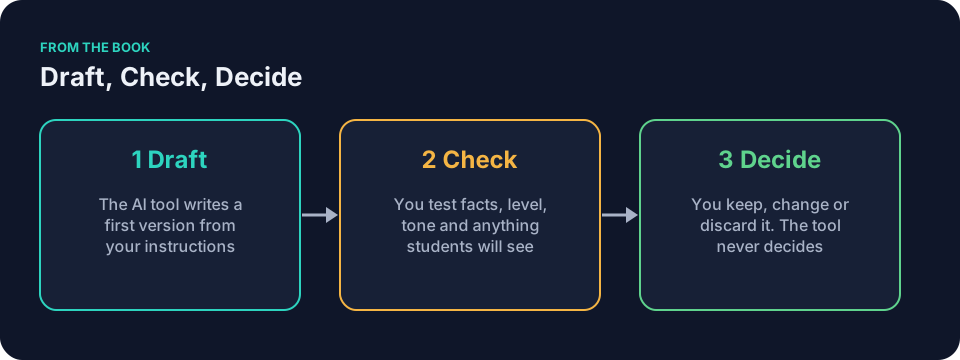
He opens a general AI assistant on his school-approved device. No student names go into the prompt. No graded papers either. Just the bare facts he wants the tool to use. This is where AI writing tools for teachers earn their keep: the tool drafts, the teacher checks, the teacher decides.
Rewrite directions for clarity
Frank needs the prompt to act like a careful colleague. He gives it the exact job instead of a vague wish. The seven ingredients from the book help him build the request once and reuse it.
He lists the topic, the exact objective, the reading level he wants, the number of steps students must follow, and the tone he prefers. He adds one example of his own past wording so the tool will not invent a new voice. Then he tells it to output the directions first, followed by a short list of places he should check.
Here is the kind of muddy direction Frank starts with.
“Look at the documents and think about the causes. Then write your answer using evidence.”
A draft might come back as four clean steps that move in order.
- Read Document A and Document B.
- Underline one sentence in each that names a cause of the war.
- Write a claim that answers the question.
- Support your claim with evidence from both documents.
Frank reads it twice. He changes “Read Document A and Document B” to “Read Document A and Document B in order. Circle the author and date at the top of each one before you underline anything.” The second version feels like his own work with the rough edges smoothed.
You can start the same way. Open your general AI assistant and paste a block like this.
You are helping a [grade level] [subject] teacher write clear student directions.
Context: [grade level] [subject], [assignment type] on [topic], students have [what they have already read or done] but need explicit steps.
Goal: Rewrite these directions so every student knows exactly what to do in the first five minutes.
Constraints: Use short sentences. Limit to [number] steps. Reading level around [target level]. No names, no grading language, no new content.
Example of my voice: [paste one or two sentences you have written for students]
Output shape: Number the steps. End with one sentence that tells students how to use their notes.
Review: Flag any step that could be read two ways. Suggest one improvement only.
Original directions: [paste your text here]
Run the prompt. Read the result against your own knowledge of the class. Keep what works. Change the rest.
AI writing tools for teachers work best when the prompt carries the seven ingredients. Context sets the scene. Goal names the single job. Constraints list what the tool must not add. Examples show your tone. Output shape tells the tool how to arrange the text. Review points out spots for you to inspect. Iteration lets you fix one flaw at a time.
A common mistake with AI writing tools for teachers is to ask for a complete handout in one vague request. Without those details, the tool has to guess the grade level, the prior knowledge and the materials on hand. Check for all three before you use the draft. A narrower prompt makes it easier to see which facts and instructions you still need to check.
Adjust reading level without losing meaning
Picture Maya Rodriguez in eighth-grade science. She has a strong handout on thermal energy but knows three students will struggle with the vocabulary. She does not want to label anyone. She simply asks the tool to simplify the text while keeping every scientific fact intact.
The article on AI for differentiated instruction: one lesson, several ways in walks through the same process in more detail. The check that matters is whether the core meaning survived the simplification. Maya copies the original handout into the prompt, states the target reading level, and asks for a version that uses shorter sentences and familiar words. She keeps the diagrams exactly as they were.
Here is one sentence from her original.
“Thermal energy transfers from regions of higher temperature to regions of lower temperature through conduction, convection, or radiation.”
A simplified draft might read.
“Heat moves from warmer places to cooler places. It can move by contact (conduction), by moving liquids or gases (convection), or by radiation.”
Maya reads it aloud at her desk. She places the original and the adapted version side by side. She checks that the draft does not imply cold moves on its own. She confirms that conduction, convection, and radiation still mean the same three processes and that no term has been dropped or redefined. The rest of the handout stays usable for the whole class.
The same approach works for any material you wrote yourself. If the text is generic and contains no student information, it may be fine to paste. If you are unsure, check your school’s policy first. Paste your text, state the grade band and desired reading level, and ask the tool to adapt only the language. Then you check that nothing important disappeared.
AI writing tools for teachers can produce several versions from one reading. One stays at grade level. Another drops the reading load while the diagrams and core facts stay in place. The teacher decides which version goes to which group. The article on AI for differentiated instruction shows how to run the check that counts. Meaning must survive.
Say Jordan Kim teaches ninth-grade English. He adapts a short story excerpt for a mixed class. The original passage sits at eleventh-grade readability. He pastes the text into his general assistant and asks for a version at sixth-grade level that keeps every plot point. The draft returns with shorter sentences and common words. Jordan reads it twice. He restores one precise term the tool replaced because the story depends on it. The rest fits.
Rubric language that students can actually read
Jordan Kim sits at his kitchen table one evening, trying to write rubric language that does not sound like it came from a committee. He wants descriptors for a persuasive essay that tell students what “strong evidence” actually looks like. The first three versions feel either too vague or too legalistic.
She turns to the same general assistant. This time she includes two examples of her own past rubric language. She asks for parallel structure across all levels. She limits the tool to three performance levels instead of four so students will not drown in fine distinctions.
Here is one criterion across three levels, the kind of draft she can compare.
| Criterion: Use of evidence | Developing | Proficient | Strong |
|---|---|---|---|
| Gives examples from the text | Gives one example from the text. | Gives two specific examples from the text and explains how each supports the claim. | Gives two or more specific examples from the text and explains how each example builds the claim, noting which evidence is strongest and why. |
Jordan checks that each level assesses the same criterion. He changes one phrase that could be read as praise for length instead of quality. He keeps the rest.
You can reuse a similar prompt for any rubric. Replace the assignment type and the exact criteria you care about.
You are helping a [grade level] [subject] teacher write rubric language.
Context: [grade level] [subject], [assignment type], students need clear descriptors for [number] performance levels.
Goal: Draft rubric language that tells students exactly what each level looks like.
Constraints: Use parallel structure across all levels. Limit to [number] levels. Describe observable behaviors only. No points, no judgments about character, no vague praise.
Example of my voice: [paste one or two sentences from a rubric you have written]
Output shape: Table with one row per criterion and one column per level.
Review: Flag any descriptor that could be read two ways. Suggest one improvement only.
Criteria: [list the criteria you care about]
Run the prompt. Check that each level measures the same thing. Change any wording that sounds like it came from a legal document. You decide which words reach the students.
AI writing tools for teachers often slide into generic phrasing. The draft might say “demonstrates exemplary command” when you would simply say “uses three concrete details.” Feed the tool one paragraph you wrote last month. Tell it to match your sentence length, your contractions, and the slight dryness you use with your classes. A writing sample gives the tool a tone to work from, but you still edit the result.
Frank adds this line to his prompt.
Match the tone of the example exactly. I sound plain, a little dry, and I use short sentences when the point matters.
The next draft keeps his short sentences and drops the committee voice.
Keep your own voice
The drafts will sometimes slide into generic teacher-speak. That is normal. Give the tool one paragraph you have already written in your normal style. Tell it to match the sentence length, the contractions, and the slight dryness you use with your classes.
You do not need a perfect match on the first try. Quote the sentence you dislike and ask for one revision. Keep the rest of the draft untouched. This is the iteration step. One narrow change at a time.
The article on AI for teacher admin: emails, notes and the small jobs shows how the same pattern works for parent messages. Denise Carter needs to write home about a difficult afternoon. She avoids any guess that could read as fact. She leaves out names. The tool drafts a calm note. She checks every line and sends it.
AI writing tools for teachers follow the same rule there. Draft, check, decide. The tool never decides.
Know when to stop
The tool will keep offering new versions if you let it. At some point the changes become smaller and the risk of introducing new errors grows. Frank sets a timer for ten minutes. When it rings he reads the current draft once more, makes any final fixes by hand, and closes the window.
The same rule applies to reading-level adjustments and rubric language. Check the actual page in front of you. Is the content accurate? Are the directions or criteria complete? Is the wording readable? Does it sound like something you would say to your class? If yes, stop. The remaining polish is not worth the extra time.
Tools and their settings change. The prompt that works this month may need a small edit next month. The checks stay the same.
The article on AI for assessment: better questions in less time explains how to ask for questions aimed at specific misconceptions. Ask for a separate answer key, then check every item. Teachers should not use the tool to make grading decisions, particularly high-stakes ones. Send questions about school policy to your administrator. The International Center for Academic Integrity is a professional association working on academic integrity.
A worked example in middle-school science
Picture Maya Rodriguez at 6:45 a.m. The coffee has gone cold again. She needs directions for a lab on heat transfer that fits a 40-minute period. Students have already read the textbook section on conduction. No extra equipment is available.
She opens her general AI assistant and pastes a prompt built from the seven ingredients. Context lists the exact facts she trusts. Goal names one clear output. Constraints ban homework and invented diagrams. She includes a sentence from last week’s worksheet so the tone stays hers.
The draft arrives in numbered steps. Maya reads it against her lesson notes. One step assumes students remember a term she has not taught. She deletes that line and writes her own. The rest needs only light edits. Total time, eight minutes.
She saves the prompt with a note about the exact facts she used. Next month she will swap the topic to convection and run it again. The structure remains.
A worked example in high-school history
Frank Bell faces the same Civil War document-based question he rewrote three times yesterday. He pastes the muddy original into the prompt block shown earlier. He adds the exact objective from his district guide and the four documents students will see.
The tool returns four numbered steps and a final reminder about notes. Frank changes two verbs to match the language he uses in class. He adds one sentence about source dates. The sheet goes to the copier at 4:27 p.m. The directions now match what he would say if he stood at the front of the room.
Common mistakes and how to fix them
One frequent error is to paste a full student essay into a public tool. That crosses into yellow or red territory. Keep the prompt to your own directions or rubric language. If you must show an example of student thinking, strip every identifier and ask your school first.
Another mistake is to accept the first draft without reading it against trusted sources. The tool predicts likely text. It does not verify your curriculum. You check the science, the dates, the definitions. You decide.
A third error is to chase perfection. The fourth revision adds nothing useful and eats the time you needed for grading. Set the ten-minute timer. When it ends, print or close the file.
Questions teachers ask
How do I keep student privacy when I use AI writing tools for teachers?
Never paste names, grades, or identifiable work. Before you paste source material, use your school’s policy and the Green/Yellow/Red check. Review anything students will see before distributing it. The OpenAI, Teaching with AI guide offers example prompts; check your school’s policy before using any prompt.
Can AI writing tools for teachers create an entire unit?
They can draft pieces. They can draft a sequence, but you must check the standards, order, and accuracy yourself. Break the unit into single tasks. Draft one handout or one rubric at a time. Check each against your own knowledge.
What if the draft changes the meaning?
Stop and rewrite that section yourself. The tool followed your words. You hold the content expertise. Replace the faulty line and move on. Do not ask the tool to rewrite the whole page again.
How do I make the rubric sound like me?
Feed it two or three sentences you have already used with students. Add the line about tone. Run the prompt. If one descriptor still feels off, quote it and ask for one targeted change. Keep the rest.
Does this work for elementary directions?
Yes. Change the target reading level to second or third grade. Use even shorter sentences. Include an example of your own board work or morning message. Check that every step can be completed in the time you have.
Should I let the tool pick the reading level?
No. You state the target. The tool drafts. You read the result aloud and decide whether the meaning held. The article on AI for differentiated instruction gives the exact check.
The chapter “Your General AI Assistant” in Keep It Simple: AI for Teachers connects to this way of working. The patterns stay the same. Draft, check, decide. The prompt is the instruction, not the product. A free sample on this site contains the first four chapters.
Next step you can take tonight
Open the general AI assistant your school has approved. Pick one handout that has bothered you for weeks. Paste the first prompt block above. Spend ten minutes. Stop when the timer ends. Change one sentence if you need to. Print it. That is enough for tonight.