At 6:52 p.m. Maya Rodriguez stares at a blank lesson template for tomorrow’s eighth-grade science block. The coffee in her mug has gone cold. She has ten minutes before dinner. Instead of forcing another blank start, she opens a general AI assistant her school has approved and types a short request.
That evening starts five low-risk tasks. Each stays inside the ten-minute limit. Each follows the same pattern. The tool drafts. You check. You decide. Nothing reaches students until you have read every word.
Throughout this AI guide for teachers, save the draft, the sentence you changed, and why you changed it. You will find one task for each weekday, a specific check to run, and a clear definition of what counts as success by Friday afternoon.
Why this AI guide for teachers starts with one task a night
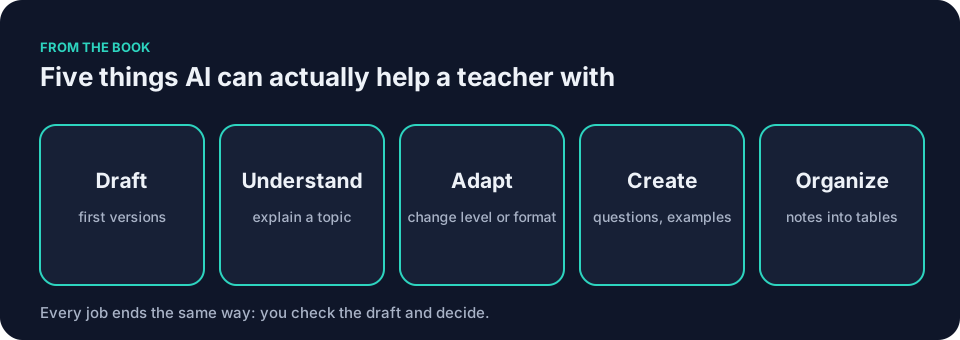
You do not need to become an AI expert. You need one usable draft tonight that you can read before the timer ends. The five things AI can actually help with stay simple here: draft, understand, adapt, create, organize.
Pick the piece of work already eating your planning time. Set a ten-minute timer. Stop when it rings. The rest of the AI guide for teachers can wait until next week.
Monday: draft one lesson opener
Open a general assistant such as ChatGPT, Claude, Gemini or Microsoft Copilot. Give it your grade, your learning objective, and one misconception you want to surface. Ask only for a five-minute opener activity. Stop at ten minutes.
You are helping a [grade] teacher plan a [subject] lesson on [topic].
The learning objective is [objective].
Students often believe [misconception].
Draft a five-minute opener activity that surfaces that misconception.
Keep every sentence under [number] words. Use no materials beyond [materials you have].
Picture Maya at her kitchen table. She names the exact objective for energy transfer. She lists the misconception that cold moves from one object to another. She caps sentence length at twelve words and lists paper and pencil only.
What to notice is which details the tool guessed right and which it missed. One activity assumes materials she does not have. The tone sounds more formal than her classroom voice.
Success is a single draft you can read in full. You do not need to use it. You only need to see where it fits your room and where it does not.
Tuesday: check the draft against your materials
Take yesterday’s opener and compare it line by line with your own notes or textbook. Mark every claim that needs verification. Change at least one sentence so it matches your exact wording. Ten minutes.
Maya sits with the draft next to last year’s slides. She crosses out two sentences that reverse the direction of energy transfer. She rewrites them in the phrasing her district requires. The tool gave her a starting shape. She supplies the accuracy.
What to notice is which specific sentences you changed and why. A reversed process, a vague verb, a term your students have not met yet. Those edits tell you what to spell out in your next prompt.
The seven ingredients that turn vague requests into reusable prompts
A vague request makes the tool guess the grade, the objective, the length, the materials, and the voice. A stronger prompt removes most of the guesswork. The seven ingredients are context, goal, constraints, examples, output shape, review, and iteration.
Here is a vague request turned useful. The first version asks for a worksheet. The second version gives every detail the tool would otherwise invent.
Make me an energy worksheet.
You are helping an eighth-grade science teacher draft classroom materials.
Context: Topic is energy transfer. Learning objective is that students explain how thermal energy moves between objects. Content already taught: thermal energy transfers from warmer objects to cooler ones. Cold is not a substance that moves. During a phase change, added thermal energy can go into changing state rather than raising temperature. Class has mixed reading levels. Available materials are ordinary paper and pencil. No lab equipment or color printing.
Goal: Draft a 15-minute retrieval-practice worksheet that I will review before students see it.
Constraints: Use plain language. Include eight short retrieval questions, one short-response question, and a two-question exit ticket. Do not add homework, extensions, a full lesson plan, extra diagrams, invented standards, citations, or student information. Keep the science within the facts listed above.
Examples: Use familiar classroom objects such as a mug, spoon, table, or cold pack. Include at least one item that surfaces the mistaken idea that cold moves from one object to another.
Output shape: 1. Student-facing success criteria. 2. Student worksheet. 3. Teacher-facing misconception note. 4. Separate answer key.
Review: Flag any scientific statement, answer, or wording I must verify. Identify any item with more than one defensible answer. Do not call the draft ready for students.
After drafting, wait for my revision requests.
The second version is longer yet easier to check. Save the block and change only the topic and facts next time. The prompt is the instruction, not the product. You still read every line.
Wednesday: adapt one existing resource
Choose a worksheet or reading you already use. If your school has approved a suitable tool and permits sharing the resource, paste the text into a document-grounded tool such as NotebookLM, or a teacher-specific tool such as MagicSchool or Brisk. If you are unsure whether a resource may be pasted, check your school’s policy first. If no tool is approved or sharing is not permitted, rewrite one paragraph manually, then compare that version with the original.
Here is a passage from my [subject] materials:
[paste text]
Rewrite it for students who need shorter sentences.
Keep every fact exactly as written. One idea per sentence.
Do not add examples, dates, or claims that are not in the original.
Say Frank Bell tries this with a social studies reading on the Bill of Rights. He feeds the tool his original paragraph and asks for the same facts with one idea per sentence. The new version arrives with clean breaks between ideas.
What to notice is whether the shorter version loses an explanation or a useful distinction. If it does, add that requirement to the prompt and run it again.
The prompt’s instruction to keep facts unchanged is not a check. Before you use the adapted passage, compare every factual claim in it with the original text. Look for dropped qualifiers, shifted dates, and examples that were never in your source. Fix anything that does not match, or delete it.
Before you paste anything, run through the teacher’s AI checklist. It covers what to confirm before you open the tool, while you work, and before anything reaches students.
How the Green/Yellow/Red rule fits into your week
Before you paste anything, sort the material into one of three colors. Green means go ahead: generic planning, public information, material you wrote yourself that names nobody. Yellow means ask first: anonymized student work, internal school documents, anything a student will use directly. Red means not into a tool your school has not approved: student names, grades, attendance records, discipline notes, IEP details, health information, or any piece of student work that could identify the writer.
Anonymized student work is Yellow. Remove every detail that could identify the writer. Then check your school’s policy and ask before you paste. The rule appears in full in Student data and AI: what never goes into the prompt. If you are unsure, treat it as Yellow and ask.
Thursday: create one set of questions
Ask the tool to draft four multiple-choice questions and one short-answer item on a single concept. Supply the exact facts it may use and nothing else. Require a simple table so you can scan it quickly. Ten minutes.
Draft four multiple-choice questions and one short-answer question for [grade] [subject].
Use only these events: [list your events].
Ask students to reason about the order of the events, not to recall them from memory.
Put the questions and answers in a table. Flag any question you cannot answer from the events given.
Say Jordan Kim uses this for history exit tickets, listing four events students have studied and asking the tool to build questions about their sequence. The draft gives a usable skeleton.
What to notice is any event or detail that was not in the list you supplied. Delete the question that contains it, or fix it against your trusted source. Never assume the tool is right. You check every claim before it reaches a student.
Friday: organize your feedback pile
Write three short sample student responses yourself, the kind you see every week, and paste them into a teacher-specific tool. Ask it to group them by shared misunderstanding.
Here are three short student responses about [topic]:
[paste your three sample responses]
Group them by the misunderstanding each one shows.
Name each group in a few words.
If a response fits more than one group, say so instead of forcing it.
Spend the rest of the ten minutes reading the grouped list. Check whether any response fits more than one group, and move it yourself where it belongs.
If you want to try this with real student work, do it only if your school’s policy and the approved tool permit it, and only after removing every detail that could identify the writer. Anonymized student work is a Yellow under the Green/Yellow/Red rule, which means ask first.
What to notice is whether the groups match what you saw when you read the responses yourself. If the grouping looks right, write down why you agree with it. If it does not, write down which response you would move and where.
What to avoid in week one
Do not feed any tool student names, grades, attendance records, or work that could identify the writer. Follow the Green/Yellow/Red rule. If you are unsure about student information or about a tool, do not paste it. Check your school’s policy first.
Never let the tool assign a grade or decide on a referral. That decision stays with you.
Skip browser extensions on school devices until your technology team has reviewed them. Do not chain five prompts in one evening. When the timer ends, save the draft and stop. Check it with fresh eyes the next day. Tools and their settings change often, so verify the current options inside your approved platforms each time.
Schools write their own guidance. The TeachAI, AI Guidance for Schools Toolkit offers one free starting point. The UNESCO, Guidance for generative AI in education and research (2023) supplies global reference material.
What counts as success at the end of the week
You finish Friday with five saved work items in a single document: Monday’s opener prompt, Tuesday’s corrected draft, Wednesday’s adapted passage, Thursday’s question set, and Friday’s grouped feedback. You have read every word the tools produced. Next to each item you have written one line about what you checked and what you decided.
Some of those lines will describe a fix: a corrected sentence, a deleted question, a response you moved to another group. Some may say you checked the output and kept it as is, with the reason noted. Both count.
You can also point to one place where the tool added extra work you had to undo. That is useful information too.
Common mistakes when following an AI guide for teachers
One mistake is to treat the first draft as final. The tool drafts. You check against your trusted sources. You decide what stays. A second mistake is to paste real student work without anonymizing it first. Remove names, dates, locations, and any unique detail. A third mistake is to skip the output shape. A plain list of questions is harder to scan than a table with columns for question, options, and flag.
Fix each one by adding one missing ingredient to the next prompt. Context for grade and objective. Constraints for length and materials. Examples for tone and depth.
AI guide for teachers in a middle-school science example
Picture a seventh-grade life-science teacher who needs a five-minute opener on food webs. The objective is that students trace energy from producers to consumers. The teacher wants to catch arrows drawn from the eater to its food. In a food web, an arrow points from the organism eaten to the eater, showing the direction of energy transfer.
The prompt lists the exact objective, the misconception, the time limit, and the materials on hand. The draft arrives with an activity that uses paper arrows on desks. One line assumes colored pencils. The teacher removes the colored-pencil requirement and checks the remaining directions against the paper and pencil actually on hand. The edited version takes eight minutes to review.
The same pattern works for a high-school history teacher adapting a primary-source excerpt or an elementary teacher grouping math exit tickets. The checks stay the same. The teacher supplies the curriculum knowledge.
Questions teachers ask
How long until I can trust the output?
You never trust it outright. You read every sentence against your own materials. Notes about errors can help you revise a prompt, but every new output still needs checking. The AI guide for teachers depends on keeping the check step non-negotiable.
What if my school has not chosen a tool yet?
Ask which tools, if any, the school approves before entering school material. If none are approved, do Monday’s planning task with a blank document and a timer instead. Write the opener yourself in ten minutes, then use the same seven ingredients to plan tomorrow’s prompt for when a tool is available.
Can I use this AI guide for teachers with students present?
Not in week one. Keep every task on your side of the desk. Once you have checked a draft and decided it is ready, you may bring it into the room. The decision remains yours.
How do I store the prompts I write?
Copy the reusable block into a single document. Add a short note after each use: which sentence you changed and why. The notes become your own short list of what works in your classroom.
Does this replace planning?
No. It offers a starting draft, which you may keep, change, or discard. You still choose the objective, verify the content, and shape the final version for your students.
The book includes a chapter called The 7-Day Keep It Simple Challenge, a longer version of this idea. This AI guide for teachers is the shorter starting plan. Keep It Simple: AI for Teachers describes the full challenge, and the free sample contains the opening four chapters.
Tonight, pick one low-risk task, the kind that is already eating your planning time. Set a ten-minute timer. Write the first prompt using the seven ingredients from How to write AI prompts for teaching: the seven ingredients. Save what you make. Read it with fresh eyes tomorrow.