Picture a head of science at 7:12 p.m. The department office is quiet except for the hum of the projector someone forgot to switch off. She has just finished reading thirty-seven lesson outlines that all sound alike. Down the corridor, the head of English stares at a stack of essays that arrived fully formed and perfectly formatted. Each leader faces the same decision tonight. Which parts of this work will they hand to a tool, and which parts will they keep.
Generative AI in education can change who produces a first draft. It does not remove the time needed to check it. It does not change the core of the job. Heads of department see this split clearly when they look at real piles of work at the end of a long day. The tool can draft. The teacher must still check and decide.
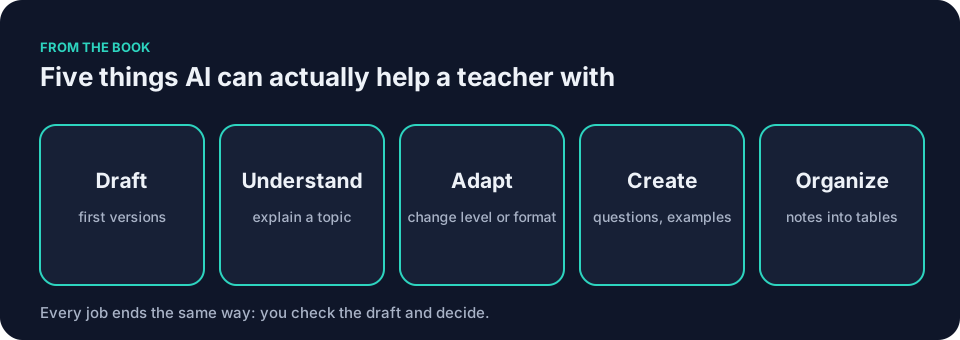
What generative AI in education actually shifts
Drafting moves to the tool. A general assistant such as ChatGPT, Claude, Gemini or Microsoft Copilot can produce a first version of a worksheet, a parent email, or a set of discussion questions. Five kinds of help cover most classroom needs: DRAFT, UNDERSTAND, ADAPT, CREATE, ORGANIZE. Each output still needs a teacher’s check before it reaches students.
A tool can produce a first draft; the teacher still needs time to check it. Try the ten-minute version tonight. Pick one low-risk task and see what a first draft looks like.
Assessment design must change. A take-home essay alone may no longer give a teacher enough evidence of how a student developed an argument. Detection is a losing game. Leaders need to redesign tasks so that process evidence, in-class drafting, short oral check-ins, and local or personal context become central. The piece AI and academic integrity: assignments that still mean something explains why detection fails and how to build assignments that keep their meaning.
Integrity conversations become routine. Some students may use these tools. Access varies. Honest discussion about when and how they may use them replaces secrecy and suspicion. A clear class policy, shared at the start of the year, gives teachers and students terms they can refer back to.
Bias needs checking. Koushik Deb researches bias in multilingual large language models across English, Hindi and Bengali. Ask staff to review every output for bias before it reaches students. The piece Responsible AI in the classroom: a short set of house rules includes wording a department can adapt.
For generative AI in education, set a department rule: teachers check and approve any tool-drafted material before students see it. The tool produces text. The department decides the rules.
What stays human
Judgment never moves to the machine. The workflow remains Draft, Check, Decide. The tool drafts. You check it against your knowledge of your students, your subject, and your school’s values. You decide what reaches the classroom.
Relationships stay yours. No prompt can replace the moment Maya Rodriguez notices the quiet student in third period has not spoken in three days and decides to adjust her approach. Frank Bell’s ability to read a room cannot be encoded. Jordan Kim still decides which of the twenty-seven responses deserves a longer comment and why.
Knowing your students remains the foundation. A document-grounded tool such as NotebookLM works from documents you provide. Staff must check school policy before uploading any material. It cannot tell you that Eli Thompson writes better when he can sketch first. That insight comes from lived experience in your building.
The prompt is the instruction, not the product. A vague request makes the tool guess grade level, prior knowledge, and classroom constraints. A clear prompt with seven ingredients gives the tool less room to invent. Those ingredients are context, goal, constraints, examples, output shape, review, and iteration. The teacher still supplies the judgment the tool lacks.
Generative AI in education: one assignment, before and after
Take a 10th-grade history essay on the causes of the First World War. Before redesign, the task is a single take-home essay due in two weeks. After redesign, the same question becomes a three-part task, and the essay stays.
The original instruction reads:
Write a 1,200-word essay on the causes of the First World War, due in two weeks.
The revised student-facing instruction reads:
In class today, draft a thesis statement. Tonight, write a short process note explaining which sources you consulted and why. Next week, you will have a five-minute conversation with me about your argument. After the conversation, write a short reflection on what changed in your thinking. The 1,200-word essay is still due in two weeks.
At the thesis stage, the teacher checks that the claim is arguable and matches the student’s in-class work. At the process note stage, she checks that the sources exist and that the student can explain why each was chosen. She tells students to list the exact sources they used and to be ready to point to the page or passage that supports their claim. At the conversation stage, she asks how the student reached the argument. This gives her another chance to see the thinking behind it.
The final submission is a folder containing the thesis statement, the process note, the essay, and the reflection written after the conversation. The teacher reads the folder, not just the final essay. She sees how the argument developed.
The decision staff must make is whether this kind of redesign fits their subject and their workload. It adds steps. It also adds evidence.
A worked department decision on assessment
Say a history department agrees to redesign one major assignment per term. The head of department brings the First World War essay to the meeting. The group discusses whether the three-part structure fits their classes.
One teacher points out that the five-minute conversation adds up to two hours across a class of twenty-four. The group decides to schedule conversations during a revision week when other classes are working independently. Another teacher asks whether the process note adds too much marking. The group agrees to limit the note to 150 words and to check it for sources, not style.
The department writes down the decision: one redesigned essay per term, conversations during revision week, process notes capped at 150 words. They name a review date at the end of term. This is the kind of specific agreement a department can make in one meeting.
A contrasting example for younger students
Picture a 4th-grade teacher working on descriptive writing. She keeps one substantial piece of student work: a paragraph describing a local market. She asks students to write a first draft in class, underline three words they want to improve, then swap with a partner for one suggestion.
The tool never sees the student work. The teacher might use a general assistant to draft a word bank of sensory adjectives before the lesson. She checks the list for words her students already know and removes any that feel too advanced. The writing stays with the students. The tool only helped her prepare.
For younger students, generative AI in education often works best as a teacher preparation tool, not a student-facing one. The department can agree that students below a certain year group do not use the tools directly. That is a decision for the school, not the tool.
A second example that keeps the writing
Picture a middle school math teacher using the same approach. She keeps one substantial piece of student work: a multi-step problem solved on paper. She asks students to solve it in class, explain their steps in writing, then defend their method in a one-minute partner talk.
Here is one actual problem she might use:
A rectangular garden is 12 meters long and 7 meters wide. A path 1 meter wide runs around the inside edge. What is the area of the path?
The correct answer is 34 square meters. The outer rectangle is 12 by 7, so 84 square meters. The inner rectangle is 10 by 5, so 50 square meters. The path is 84 minus 50.
The teacher inspects three things. First, whether the student subtracted the correct inner dimensions. Second, whether the written explanation matches the arithmetic. Third, whether the student can say why the path area is not simply 12 plus 7 times two. The tool can draft similar problem sets. The teacher still verifies the math and watches the conversations.
A high school English department might shift one literature assignment. Students annotate a short passage in class, submit a one-paragraph draft with their notes attached, then explain their choices in a brief recorded reflection. The teacher reads the notes first. The tool never sees the student work.
A worked review of one AI-drafted item
Say a 7th-grade geography teacher asks a general assistant to draft a worksheet on river processes. The tool produces a draft of ten questions. The teacher reads them with her class in mind.
Question three asks students to explain how a meander changes shape over time. The answer key describes erosion on the inside bend and deposition on the outside bend. She knows that is backwards. Erosion happens on the outside bend, where the water moves faster. Deposition happens on the inside bend, where the water slows. She corrects the key before she prints.
Question seven uses the phrase “fluvial deposition” without defining it. Her students have not seen that term yet. She rewrites the question in plain language and adds a short glossary at the bottom.
Question nine asks: “Give one reason why a town might be built on a river floodplain.” The answer key lists “access to water for irrigation” as the only correct response. She sees two defensible answers: access to water and flat land for building. She adjusts the mark scheme to accept either, then adds a note asking students to explain their choice.
She checks each fact, adjusts the language, and aligns the task with what her students actually know. The tool drafted. She decided.
Checking an AI draft for subject accuracy, wording, and accessibility
A head of department might model this review in a staff meeting. She projects an AI-drafted worksheet and talks through her checks.
First, subject accuracy. She reads every fact and every answer. She asks herself whether the content matches what her students have been taught. She corrects the meander error. She flags any claim she cannot verify.
Second, wording. She looks for terms her students have not seen. She rewrites “fluvial deposition” as “when a river drops the material it carries.” She shortens sentences that run past twenty words.
Third, accessibility. She checks that the worksheet does not assume prior knowledge her students lack. She adds a glossary. She makes sure the questions can be answered from the information given, not from outside reading.
Checking takes time, even when a tool produces the first draft. She spent that time checking instead.
Common mistakes with generative AI in education
A common mistake with generative AI in education is treating the first output as final. The tool can produce a draft, but its first version may contain errors or miss the curriculum. Fix it by saving the prompt and iterating on one item at a time. Quote the weak sentence and ask for one narrow change. Then check again.
Another mistake is skipping the color code before pasting. Green covers generic planning and public information. Yellow means ask first under school policy. An example of yellow is anonymized student work. Red means do not paste anything identifying or high-stakes into a tool the school has not approved. The color code itself does not grant permission. School policy does.
Some leaders assume every teacher needs the same tools. Most teachers need only three. A general AI assistant drafts and rewrites. A document-grounded tool answers from your own files. A teacher-specific tool such as MagicSchool or Brisk walks through common classroom tasks. The piece AI tools for teachers: the kinds worth knowing explains these categories in more detail. Tools and their settings change. Check what your school has approved before you start.
A final mistake is expecting the tool to understand your students. It cannot. It predicts likely text. You supply the knowledge of who sits in your room at 10:15 a.m. on a Tuesday.
How a department might agree a few shared norms
Start with the one-page set in Responsible AI in the classroom: a short set of house rules. Five principles fit on a single sheet: disclose use, a human decides, verify facts, protect data, fair access. The document also addresses bias and offers wording a department can adapt.
Print it. In the meeting, the group decides which lines to adopt as written and which to adapt. They agree on the green-yellow-red categories and name one example of each for their subject. They do not finalize every detail in the room. One teacher volunteers to draft the adapted wording and circulate it within a week.
Green covers generic planning and public information. Yellow means ask first and follow the school’s policy for approval. Red means nothing identifying or high-stakes goes into any unapproved system. The color code keeps decisions practical when everyone is tired.
Add two department-specific agreements. One on how you will redesign at least one major assignment this year to restore meaning. Another on the exact wording you will use with students when you talk about tool use. Sample student-facing disclosure wording:
If you use an AI tool for any part of this assignment, note which tool and which part in a comment on your submission.
Write both down. Revisit them at the end of each term. The sheet gives the department a shared reference when questions come up.
Name the person your school’s policy identifies for approval. Put that name on the sheet. Make sure every teacher knows who to ask before uploading anything yellow. The UK Department for Education policy paper on generative AI in schools and UNESCO’s Guidance for generative AI in education and research are useful starting points. Send teachers to your own school policy first.
A first staff meeting agenda on generative AI in education
Keep the first meeting to thirty-five minutes. This agenda is for one department meeting together, not for department heads across the school.
Spend the first five minutes showing the five kinds of help AI can offer and the three-step workflow Draft, Check, Decide. No definitions. No product pitches.
Next, walk through the green-yellow-red page together for ten minutes. The group decides which categories fit their subject and names one example of each. They agree to adopt the house rules as a starting point and assign one teacher to draft subject-specific wording within a week.
Spend ten minutes on assessment. Share one redesigned assignment as an illustration. Propose that every teacher redesign at least one major assignment this year. Ask staff to discuss whether this fits their subject and workload. Agree as a department what support the leader will arrange.
Use the next five minutes to direct everyone to AI tools for teachers: the kinds worth knowing. Present three categories to consider: a general AI assistant, a document-grounded tool, and a teacher-specific tool. Not every teacher needs all three.
Reserve the final five minutes for recording decisions. One teacher writes down the agreed wording for the student disclosure and the assignment redesign commitment. The group names the policy contact and adds that name to the printed norms.
Staff leave with a printed copy of the one-page norms, one redesigned assignment to adapt, and the name of the person to consult under school policy.
End with the ten-minute version. Pick one low-risk task tonight. Nothing more.
A meeting decision record
Before the meeting ends, record decisions, policy checks, and open questions on one sheet. Use this template:
Agreed norm: [the wording the department will use with students about tool use]
Policy question: [what needs checking under school policy]
Contact: [the person named in school policy]
Assignment to revise: [which task, which class]
Owner: [who will draft the revision]
Review date: [when the department will look at it again]
Circulate the sheet within two days. Refer back to it at the next meeting.
Generative AI in education: questions teachers ask
How do I write a prompt that actually helps?
Start with the seven ingredients. Give context such as grade level and what students already know. State one clear goal. List constraints so the tool does not add extras. Provide an example in your own voice. Specify the output shape. Ask the tool to flag items for review. Then iterate on the draft instead of starting over. The prompt is the instruction. The teacher remains the decision maker.
Here is a reusable prompt for drafting a worksheet. Copy it and change the bracketed parts.
You are helping a [grade and subject] teacher draft classroom materials.
Context:
- Topic: [topic]
- Learning objective: [objective]
- Content already taught: [list key facts]
- Class conditions: [mixed reading levels, limited materials, etc.]
Goal:
Draft a [time] activity that I will review before students see it.
Constraints:
- Use plain language.
- Include [exact number and types of items].
- Do not add [homework, diagrams, invented standards, citations, student information].
- Keep all content within the facts listed above.
Examples:
Use familiar classroom objects such as [examples]. Surface the common misconception that [misconception].
Output shape:
1. Student-facing success criteria
2. Student worksheet
3. Teacher-facing notes
4. Separate answer key
Review:
Flag any statement, answer, or wording I must verify. Identify any item with more than one defensible answer. Do not call the draft ready for students.
After drafting, wait for my revision requests.
What if a student uses the tool without telling me?
A clear policy stated at the start of the year helps. The policy should require disclosure of which tool and which part. Short oral check-ins and process notes give the teacher evidence of how a student developed an answer. They do not establish whether undisclosed tool use occurred. The conversation matters more than the detector. See the linked piece on academic integrity for more redesign ideas.
Can a document-grounded tool read my entire unit plan?
Capacity and settings vary. Staff must check the tool and school policy before providing any plan. Upload only what the policy allows. The tool works from the documents you provide. You must check its summary against the originals. It still cannot know your students the way you do.
How much time should we spend on this at first?
Ten minutes. Pick one low-risk green task tonight. Draft a set of questions or a parent note. Check it. Decide what to keep. Do not build a whole new system in one evening.
The book
The book Keep It Simple: AI for Teachers includes a chapter titled Build Your Three-Tool Teacher System. The free sample contains the first four chapters.
Next step
Bring one existing assignment and the decision-record template to your next scheduled department meeting. Use the agenda above. Fill in the template together before you leave the room.